Why Customers Say “I’ll Just Cancel the Order” — And How to Prevent It
An order comes in. Payment is captured. Everything looks fine. Then, minutes later, a support ticket appears:
“Hi, I just placed an order… can I cancel it?”
Most customers don’t wake up planning to cancel. The decision usually happens after checkout in that quiet moment when excitement fades, and doubt creeps in. Maybe they noticed the wrong size. Maybe the shipping feels too slow. Maybe they simply changed their mind. For Shopify merchants, these cancellations aren’t just minor interruptions. They create operational friction refunds, payment reversals, inventory adjustments, and extra support work.
But here’s the part many stores overlook:
Not every cancellation is about regret. Many happen because customers feel stuck. When shoppers can’t fix a small mistake like an address typo or a variant change, canceling feels like the only option.
In this article, we’ll break down why customers cancel orders after checkout, the psychology behind that impulse, and what merchants can do to prevent avoidable cancellations without adding more workload to their team.
Why Customers Cancel Orders After Checkout
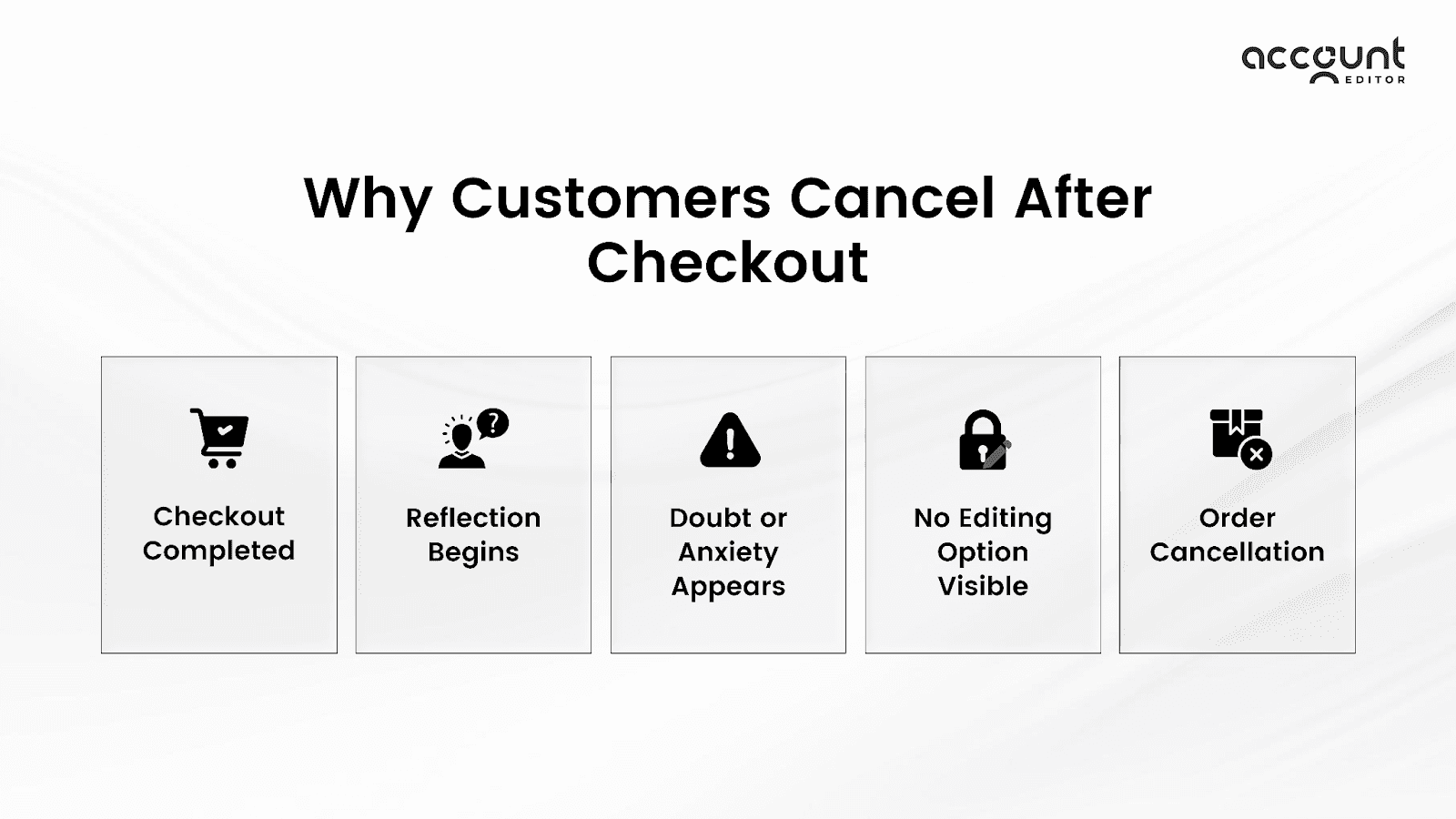
The checkout moment feels decisive. Payment is processed, the confirmation page appears, and the order is officially placed. But psychologically, the buying journey doesn’t end there.
For many customers, checkout is followed by reflection, and reflection is where cancellations begin. If merchants want to reduce cancellations, they must first understand the emotional and practical triggers that surface after the purchase is complete.
Here are the most common ones.
1. Post-Purchase Regret
This is the classic trigger.
During checkout, urgency drives the decision. Limited stock, discounts, social proof, and momentum push customers to complete the purchase. Once the transaction is done, the urgency disappears.
Now the customer starts asking:
Did I really need this?
Was that the right choice?
Could I have found it cheaper?
Did I just overspend?
This shift from emotion to logic is called buyer’s remorse. It’s one of the biggest reasons why customers cancel orders after checkout.
The key point for merchants: regret often appears within minutes of purchase, especially for impulse buys or higher-priced items.
2. Checkout Anxiety & Second Thoughts
Checkout can feel rushed. Customers move quickly to secure an item before it sells out or before a promotion ends. In that rush, they don’t always review every detail carefully.
Once the confirmation email arrives, they slow down and re-evaluate:
Was the product description accurate?
Did I read the return policy properly?
Is the brand trustworthy?
If something feels unclear, anxiety grows. And when anxiety grows, cancellation feels like a safety mechanism. This isn’t always dissatisfaction. Often, it’s uncertainty.
3. Fear of Wrong Details (Address, Variant, Size)
This is where many cancellations are completely preventable.
A customer opens the confirmation email and notices:
A typo in the shipping address
The wrong size was selected
The wrong color variant
Incorrect quantity
At that moment, they don’t want to cancel. They want to fix the mistake. But if there’s no visible way to edit the order, the customer assumes cancellation is the safest option.
From their perspective, canceling and reordering feels easier than contacting support and waiting for a response. These friction-based cancellations are operational, not emotional, and they’re often avoidable with a better post-purchase experience.
4. Shipping Cost or Delivery Doubts
Shipping clarity plays a major psychological role after checkout.
Customers may begin questioning:
Is the delivery time longer than I expected?
Was the shipping cost worth it?
What if it doesn’t arrive on time?
Can I change the shipping address?
If expectations don’t match reality, doubt sets in quickly. For time-sensitive purchases, even small delivery concerns can trigger immediate cancellation.
When customers feel uncertain about logistics, they often act fast before the order moves to fulfillment.Learn how self-service post-purchase edits reduce cancellations and support load.
The Psychology Behind Order Cancellations
Order cancellations are rarely random decisions. In most cases, they are psychological reactions triggered after checkout, not before it.
The buying journey does not end when payment is captured. In fact, that is often when emotional processing begins. Customers move from urgency to evaluation. They shift from excitement to analysis. And if that analysis creates discomfort, cancellation becomes the easiest way to remove it.
To reduce cancellations effectively, merchants need to understand the behavioral forces operating in that short window after checkout.
1. Loss Aversion
Loss aversion is one of the strongest behavioral drivers in commerce. People experience the pain of losing money more intensely than the satisfaction of gaining a product.
Before checkout, the customer focuses on what they are gaining: the item, the deal, the convenience. After checkout, attention shifts to what they have lost the money, leaving their account. When the confirmation email arrives, and the total amount is visible, the transaction becomes real. If doubt appears at that moment, even briefly, the brain seeks relief. Cancellation becomes a way to reverse the perceived loss.
This explains why many cancellations happen quickly, sometimes within minutes of purchase. The emotional shift is immediate.
2. Instant Gratification vs. Delayed Fulfillment
Online shopping provides instant emotional reward. The act of clicking “Buy Now” creates a small dopamine spike. It feels satisfying. But the product does not arrive instantly.
There is a gap between emotional gratification and physical fulfillment. That gap creates space for second thoughts. The longer the perceived delay, the greater the opportunity for doubt to grow. If delivery timelines feel slow or unclear, customers begin re-evaluating the purchase. The excitement fades, and practicality takes over. In that moment, canceling can feel like a rational reset.
This dynamic is especially common with impulse purchases or non-essential items.
3. Control & Reassurance
Perhaps the most overlooked psychological trigger behind order cancellations is the need for control. During checkout, customers have full flexibility. They can change quantities, update shipping details, and swap variants. They feel empowered.
After checkout, that flexibility often disappears.
If a customer notices a small mistake, an incorrect address, a wrong size, or a missing item, and cannot immediately fix it, anxiety increases. The feeling of being locked into a decision creates discomfort.
Cancellation then becomes a way to restore control. In many cases, the customer does not want to abandon the purchase. They simply want reassurance that they can correct it. When that reassurance is missing, canceling feels like the safest option.
Many cancellations actually stem from predictable errors that happen right after checkout. We list them and show how to avoid them in our post on common post-checkout pitfalls many Shopify brands overlook.
Which Order Cancellations Are Actually Preventable?
Not every cancellation can or should be stopped.
Some customers genuinely change their minds. Some reconsider their budget. Others realize they no longer need the product. Trying to eliminate every cancellation is unrealistic and can even harm customer trust. The real opportunity lies in understanding which cancellations are preventable and designing your post-purchase experience around that distinction.
1. Emotional Cancellations (Harder to Prevent)
Emotional cancellations are driven by internal decision shifts.
These include situations where the customer:
Experiences buyer’s remorse
Feels the purchase was impulsive
Finds a better alternative elsewhere
Simply changes their preference
In these cases, the customer is reconsidering the purchase itself, not correcting an operational issue. While stronger product positioning, clearer policies, and trust-building can reduce these over time, they cannot eliminate them. A healthy store will always see a small percentage of emotionally driven cancellations.
The key is not to fight these aggressively, but to focus on the cancellations that stem from friction rather than regret.
2. Friction-Based Cancellations (Highly Preventable)
Friction-based cancellations are where most merchants lose unnecessary revenue. In these cases, the customer still wants the product. They just noticed something wrong after checkout:
A typo in the shipping address
The wrong size or variant swap was selected
Incorrect quantity
A missing item they meant to add
Here’s the important distinction:
The customer doesn’t want to cancel. They want to edit.
When there is no visible way to modify the order, cancellation becomes the workaround. From the shopper’s perspective, canceling and placing a new order feels faster than opening a support ticket and waiting for a response. This is where structured post-purchase editing changes the equation. On Shopify, merchants can manually edit orders in the admin before fulfillment begins. However, relying entirely on support teams to handle these requests increases operational load and response time.
Apps like Account Editor are built specifically to address this friction. Instead of forcing customers to cancel, it allows them to update their shipping address, swap variants, modify quantities, or even add items within a defined editing window before fulfillment starts. By giving customers controlled flexibility after checkout, many friction-based cancellations simply turn into corrected orders. The psychological impact is significant. Customers feel reassured and in control. Merchants reduce unnecessary refunds and support tickets. Operations remain intact because edits are restricted by timeframe and fulfillment status.
The distinction becomes clear: Emotional cancellations are about changing minds. Friction-based cancellations are about fixing mistakes.
And mistakes can be prevented from becoming cancellations when customers are given a secure way to correct them.
How to Reduce Order Cancellations in Shopify
Reducing cancellations isn’t about restricting customers. It’s about reducing uncertainty after checkout. On Shopify, once payment is captured, customers typically cannot modify their order themselves. If they spot a mistake or feel unsure, their only visible options are contacting support or canceling entirely. That gap between checkout and fulfillment is where preventable cancellations happen.
Here’s how Shopify merchants can close that gap strategically.
1. Offer a Clear Post-Purchase Editing Window
One of the most effective ways to reduce order cancellations is to define a short, structured editing window after checkout.
This window allows customers to make corrections before the order moves into fulfillment. Even a limited timeframe, such as 30 minutes, 2 hours, or until fulfillment begins, significantly reduces panic-driven cancellation requests. When customers know they can adjust details within a controlled period, they feel reassured. The urgency to cancel disappears because flexibility exists.
On Shopify, merchants can manually edit orders in the admin before fulfillment. However, scaling this through support teams can increase workload and slow response times.
This is where structured solutions like Account Editor help. It allows merchants to define an editing timeframe and automatically enable customers to modify eligible details within that window without compromising operational control. The key is clarity. Customers should immediately see that editing is possible, so cancellation does not feel like the only option.
2. Allow Address & Variant Changes
Many cancellations stem from simple mistakes.
A wrong apartment number.
The wrong size was selected.
A color variant chosen too quickly.
If customers cannot correct these easily, they cancel and reorder.
Allowing address and variant updates before fulfillment begins removes the need for that drastic step. On Shopify, order edits can be made before items are fulfilled, and shipping rates or taxes can recalculate if configured correctly. When customers can fix mistakes instead of abandoning the order, revenue is preserved, and operational flow remains intact.
Structured editing tools ensure that:
Edits are only allowed before fulfillment
Payment differences are handled correctly
Orders stay compliant with Shopify’s native workflow
The result is fewer refunds and fewer duplicate orders.
3. Reduce Support Dependency
Every cancellation request creates operational friction:
Support tickets
Refund processing
Payment reconciliation
Inventory adjustments
When customers rely entirely on support to resolve small issues, delays increase anxiety. If they don’t receive a fast response, cancellation feels safer. Reducing support dependency means enabling controlled self-service for simple changes. When customers can update eligible order details themselves within a defined timeframe, support teams are freed from repetitive correction tasks.
For Shopify merchants, this creates two measurable benefits:
Lower ticket volume
Faster operational processing
Instead of managing preventable cancellations manually, the system handles controlled edits automatically.
4. Communicate Delivery & Refund Policies Clearly
Psychology plays a major role in cancellation decisions, but communication does too. Unclear shipping timelines or refund policies increase post-purchase anxiety. If customers are unsure when their order will arrive or how refunds work, they may cancel preemptively.
To reduce this:
Display realistic delivery estimates
Clearly explain refund and cancellation policies
Confirm fulfillment status transparently
When expectations are clear, uncertainty decreases. And when uncertainty decreases, cancellations follow the same direction.
Replace Cancellations with Controlled Edits
Most preventable cancellations happen because customers feel stuck. When a shopper notices a mistake after checkout, a wrong address, size, or quantity, and sees no way to fix it, canceling feels like the safest option. In many cases, they don’t want to abandon the purchase. They simply want to correct it.
Replacing cancellations with controlled edits changes that behavior. Instead of canceling and reordering, customers can update eligible details within a defined window before fulfillment begins. This preserves revenue, avoids duplicate orders, and reduces refund processing.
The key is structure. Edits should be limited by timeframe and fulfillment status to protect operations. On Shopify, merchants can edit orders before fulfillment through the admin. However, handling every request manually increases support workload. Tools like Account Editor allow merchants to set an editing window and enable customers to modify approved details themselves while still respecting Shopify’s fulfillment and payment logic.
The result is simple:
When customers can fix instead of cancel, cancellations drop, support tickets decrease, and revenue stays intact.
Conclusion
When a customer says, “I’ll just cancel the order,” it’s rarely a random decision. It’s usually a reaction to doubt, to anxiety, or to a small mistake they feel unable to fix.
Some cancellations will always happen. Customers change their minds, reassess budgets, or reconsider impulse purchases. That’s part of eCommerce. But many cancellations are preventable. They occur because shoppers feel stuck after checkout. They don’t see a clear way to correct an address, swap a variant, or adjust an order before fulfillment begins. So cancellation becomes the default solution.
For Shopify merchants, the opportunity is clear:
Reduce friction.
Restore control.
Add structured flexibility after checkout.
When you replace panic-driven cancellations with controlled post-purchase edits, you protect revenue, lower support workload, and improve the overall customer experience.
The goal isn’t to block cancellations. It’s to remove the unnecessary ones.
Many cancellations are preventable. If customers are canceling because they can’t fix small mistakes, give them a better option.
With Account Editor, Shopify merchants can offer controlled post-purchase editing, reducing refunds, support tickets, and lost revenue.