Common Post-Checkout Mistakes Shopify Brands Make (And How to Avoid Them)
Most Shopify store owners feel relaxed once an order is placed.
The checkout worked, the payment went through, and the sale is complete.
But for the customer, that moment often triggers a second look.
After checkout, customers usually slow down and review their order. They check the shipping address, look at the items again, and make sure everything feels right. This is normal customer behavior, but the post-checkout stage is often not planned as carefully as checkout.
When the post-checkout experience does not match how customers actually behave, small issues turn into support emails, cancellations, and refunds. This does not happen because customers are difficult. It happens because this part of the journey is often ignored.
This blog explains the most common post-checkout mistakes Shopify brands make, why these mistakes happen based on how Shopify works, and what store owners should know to avoid them.
What Post-Checkout Means in Shopify
Post-checkout starts right after a customer finishes paying for an order. It continues until the order is delivered or refunded.
After checkout, customers see a Thank You page that confirms their order. Later, they can visit the Order Status page to check order details and see delivery updates. These pages help customers understand what is happening with their order.
In simple terms, checkout is where payment is completed. Post-checkout is what keeps customers informed and reassured once the order is placed.
Why Post-Checkout Problems Are So Common
Post-checkout problems are common mainly because what happens after an order is placed depends on how each store is set up and managed.
After checkout, customers usually take a moment to review their order. They check the items, confirm the shipping address, and look at delivery details. This is normal behaviour in online shopping.
At the same time, merchants decide how orders are handled after checkout. This includes how quickly orders are prepared for shipping, whether changes or cancellations are allowed, and how these rules are explained to customers. Shopify gives merchants the tools to manage this, but it does not set these rules automatically.
Because each store handles post-checkout steps differently, customers may not always know what is allowed or what will happen next. When expectations are not clearly explained, customers may contact support, request cancellations, or feel unsure.
In simple terms, post-checkout problems happen when customer expectations and a store’s post-checkout rules are not clearly aligned.
Post-Checkout Mistakes Shopify Brands Make
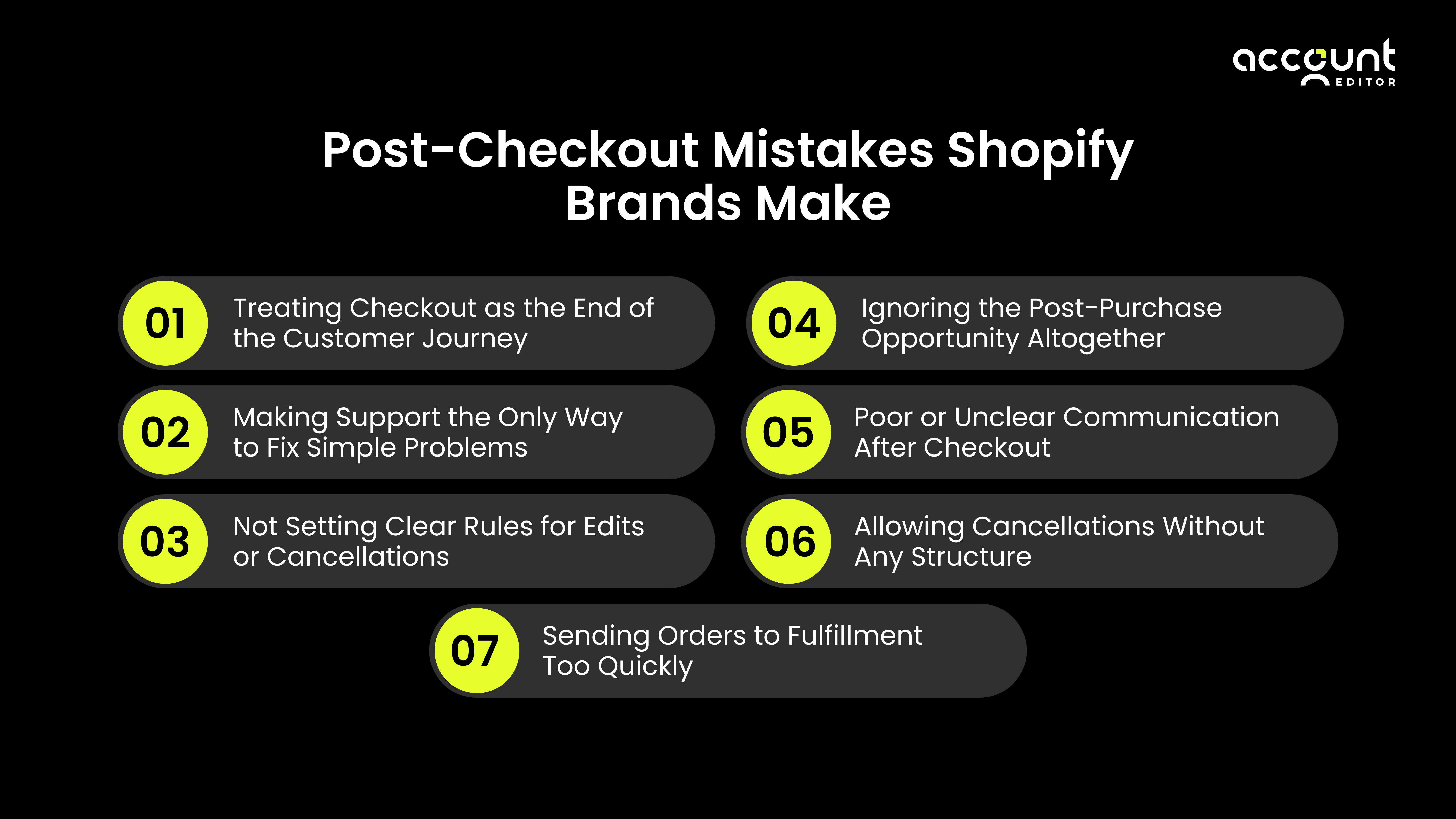
Most post-checkout problems do not happen because something goes badly wrong. They usually happen because the time after checkout is not planned as clearly as the checkout itself.
Many stores spend a lot of time improving checkout, but once payment is done, the next steps are often handled using default settings or manual decisions. This can create small gaps between what customers expect and what actually happens.
Based on how Shopify orders work and common customer behaviour after purchase, the following mistakes appear again and again. These mistakes are not caused by bad setup or poor decisions. They happen because customers behave in predictable ways after checkout, and this stage is often overlooked.
1. Treating Checkout as the End of the Customer Journey
Some stores stop guiding customers once payment is complete. After that, customers are left to figure things out on their own.
In reality, customers still want answers after checkout. They want to know what happens next, when the order will ship, and if everything is correct. When this information is not clear, customers may feel unsure.
Checkout should be seen as an important step, but not the end of the journey. Clear guidance after payment helps customers feel more comfortable.
2. Making Support the Only Way to Fix Simple Problems
By default, Shopify does not let customers edit their orders after checkout.
Because of this, small issues like fixing a shipping address or changing an item often turn into support requests. Address changes are one of the most common requests customers make after placing an order.
When customers must contact support for small fixes, support teams get more work, and small mistakes may reach shipping before they are corrected.
3. Not Setting Clear Rules for Edits or Cancellations
Shopify allows store owners to cancel and refund orders within the platform’s order and refund rules. How and when customers can request these actions depends on the store’s own policies and how those policies are explained.
Some stores clearly explain their cancellation or change policies, while others share less detail upfront. When customers are not sure what is allowed, they may need to contact support to ask for clarification, and staff may need to handle requests one by one.
When policies are clearly explained after checkout, customers know what to expect, and teams can respond more consistently and predictably.
4. Ignoring the Post-Purchase Opportunity Altogether
Customers often stay engaged after checkout. They review their order, check delivery updates, and read follow-up messages to understand what happens next.
Shopify supports this stage through features like the Thank You page and the Order Status page, which help customers view order details and track progress. These pages can also be used to share helpful information, such as delivery timelines or next steps, without affecting checkout.
When this stage is not planned, stores may miss a chance to guide customers clearly after payment. Using this time to provide useful information can help create a smoother and more reassuring order experience.
5. Poor or Unclear Communication After Checkout
Shopify sends confirmation messages after an order is placed, but these messages may not explain everything clearly.
If updates about refunds, changes, or order status are not clear, customers may check again or contact support to understand what happened. Clear messages help customers feel informed and reduce confusion.
6. Allowing Cancellations Without Any Structure
In Shopify, once a refund is processed, it cannot be undone. If an order needs to be changed after a refund, it usually requires a new order.
Shopify allows stores to decide how they handle cancellations, but these rules need to be clearly explained to customers. When cancellation policies are unclear, customers may not know what to expect, and teams may need to handle requests one by one.
Clear cancellation rules help customers understand their options and help store teams manage requests in a consistent and organized way.
7. Sending Orders to Fulfillment Too Quickly
Shopify allows orders to move to fulfillment soon after checkout, including automatic sending to fulfillment partners.
At the same time, many customers review their order shortly after placing it. They may notice a small mistake, such as an address issue or item detail, after payment is complete.
Because order changes are easier to handle before fulfillment begins, starting fulfillment immediately can limit the ability to fix these small issues. In those cases, returns or refunds may be needed instead of simple updates.
Allowing a merchant-controlled editing window can help fix small problems early while still keeping orders moving smoothly.
How Shopify Brands Can Avoid These Mistakes
Avoiding post-checkout mistakes isn’t about adding more manual checks or growing your support team. It’s about designing a post-purchase experience that anticipates mistakes and handles them automatically.
Here’s how leading Shopify brands are fixing the gaps mentioned above.
1. Treat Post-Checkout as a Continuation of the Journey
Instead of seeing checkout as the finish line, successful brands treat it as a handoff.
Customers often realize issues after payment:
Wrong address
Incorrect size or quantity
Missed items
Giving customers a structured way to fix these issues keeps confidence high and reduces regret. A controlled post-purchase editing window ensures customers feel supported without disrupting operations.
2. Let Customers Fix Simple Issues Themselves
When every small mistake becomes a support ticket, costs rise fast.
Brands avoid this by:
Allowing self-service address edits
Enabling quantity or item swaps (where safe)
Letting customers add items post-purchase
Self-service doesn’t mean losing control. It means deciding what can be edited, when, and under which conditions—so support teams step in only when truly needed.
3. Set Clear Rules for Edits and Cancellations
One of the biggest mistakes brands make is offering flexibility without boundaries.
Smart brands define:
How long customers can edit orders
Which products can or cannot be edited
When cancellations are allowed
Whether restocking fees apply
Clear rules protect margins, inventory, and fulfillment workflows—while still giving customers peace of mind.
4. Use the Post-Purchase Moment as an Opportunity
Post-checkout doesn’t have to be defensive. It can be additive.
When customers revisit their order to fix a mistake, brands can:
Recommend relevant add-ons
Offer complementary products
Increase AOV without interrupting checkout
This works because trust is already established—the purchase is complete.
5. Communicate Clearly After Checkout
Silence after checkout creates uncertainty.
Strong post-purchase communication includes:
Confirming what was edited
Notifying customers when time to edit is ending
Alerting internal teams when changes affect fulfillment or payment
Clear communication reduces follow-ups, prevents confusion, and keeps everyone aligned.
6. Add Structure to Cancellations
Unstructured cancellations hurt margins and create operational chaos.
Brands avoid this by:
Allowing cancellations only before fulfillment starts
Applying automatic refund logic
Charging optional restocking fees
Capturing cancellation reasons for insights
This keeps cancellations predictable instead of reactive.
7. Avoid Rushing Orders to Fulfillment
Sending orders to fulfillment immediately may feel efficient—but it often backfires.
A short, intentional buffer:
Prevents shipping incorrect orders
Reduces returns and reships
Allows customers to fix mistakes without manual intervention
Brands that balance speed with flexibility ship fewer wrong orders—not slower ones.
One practical way to do this is by using an order editing solution like Account Editor. Instead of relying on support for every small request, Account Editor allows customers to make certain approved changes to their order after checkout, based on the store’s rules.
By giving customers a clear and controlled way to handle common post-checkout changes, brands can reduce confusion, lower support requests, and manage orders more smoothly while staying fully aligned with how Shopify works.
Why Post-Checkout Knowledge Matters
Research on post-purchase experience shows that customers value clear information and a sense of control after placing an order. When customers can easily view their order details and understand what options are available, they generally feel more confident about their purchase.
To support this, some merchants use order editing tools that work within Shopify’s platform rules to allow customers to make certain changes after checkout in a controlled way. This helps keep post-checkout interactions clear and organized for both customers and internal teams.
Conclusion
Checkout completes the payment, but post-checkout shapes how customers feel about the order.
After checkout, customers review their order, look for updates, and want to feel confident that everything is correct. This stage includes order confirmation, communication, fulfillment, and any changes that happen before delivery. How clearly these steps are handled plays a big role in whether customers feel calm or confused.
Research and real merchant experience consistently show that many common issues, such as support requests, cancellations, and order errors, start after checkout, not during payment. These problems usually appear when customer expectations and post-checkout processes are not clearly aligned.
By understanding how customers behave after checkout and designing clear, structured post-checkout flows, brands can reduce confusion, manage orders more smoothly, and build more reliable customer experiences over time.
If customers often ask to update their order after checkout, Account Editor lets them make approved changes, like address updates or item adjustments, without breaking Shopify’s rules.