How Merchants Can Decide Which Products Customers Can Self-Edit Using Safe Edit Rules
Post-purchase mistakes are one of the most common reasons Shopify merchants lose otherwise valid orders.
Customers place an order, notice an issue with the wrong address, wrong variant, or incorrect quantity, and want to fix it immediately. The problem is simple but costly: Shopify does not allow customers to edit orders on their own after checkout. Without a self-serve order editing tool, every change request has to go through customer support.
This delay often pushes customers toward cancellation instead of correction.
According to the Baymard Institute, 18% of shoppers abandon purchases due to errors or complications in the checkout and post-checkout process.
For merchants, this creates a difficult trade-off:
Allow too much flexibility → fulfillment and inventory risk
Allow no flexibility → frustrated customers and higher cancellations
The solution is not letting customers edit everything freely.The solution is safe edit rules, enforced through a self-serve order editing tool.
Why Unrestricted Order Editing Creates Risk for Merchants
At first glance, allowing customers to freely edit their orders after checkout may sound like good customer service. In reality, unrestricted order editing creates serious operational risks for Shopify merchants, especially when edits are handled manually or without clear rules.
It is important to clarify one thing early.
Customers cannot edit orders on Shopify by default. Any form of customer-initiated order editing requires a self-serve order editing tool. Without such a tool, merchants rely on emails, chats, or tickets to handle change requests, which introduces delays and errors.
When editing is not controlled through clear rules and automation, even simple customer requests can disrupt fulfillment, inventory, and support workflows.
If you want a deeper comparison of manual versus self-serve edit workflows, check out our guide on manual order changes versus self-serve editing.
Common Post-Purchase Mistakes Customers Make
After checkout, customers often notice small but important mistakes in their orders. These mistakes are usually unintentional and time-sensitive.
Some of the most common post-purchase issues include:
Entering an incorrect shipping address or missing apartment details
Selecting the wrong product variant, such as size or color
Ordering the wrong quantity
Using an incorrect email or phone number
Customers expect these issues to be easy to fix. However, without a self-serve order editing tool, they have no direct way to make changes themselves. They must contact support and wait for a response.
This delay increases frustration, especially when the order has not yet been fulfilled and could have been corrected instantly through a controlled self-editing option.
How These Mistakes Lead to Order Cancellations
When customers cannot fix a mistake quickly, many choose to cancel the order instead. This is not because they no longer want the product, but because they fear receiving the wrong item or missing delivery altogether.
This problem becomes worse when:
Support teams are slow to respond during peak hours
Orders move quickly into fulfillment
Merchants rely on manual order edits in the Shopify admin
According to PwC, 32 percent of customers stop doing business with a brand after just one bad experience, including poor post-purchase support.
Without a self-serve order editing tool like Account Editor, merchants are forced to manually review and update orders. This creates bottlenecks and increases the likelihood of cancellations, fulfillment errors, and negative customer experiences.
By contrast, when merchants use a self-serve tool that applies safe edit rules, customers can fix eligible mistakes instantly while merchants maintain full control over what can and cannot be changed.
What “Safe Edit Rules” Mean in Shopify Order Editing
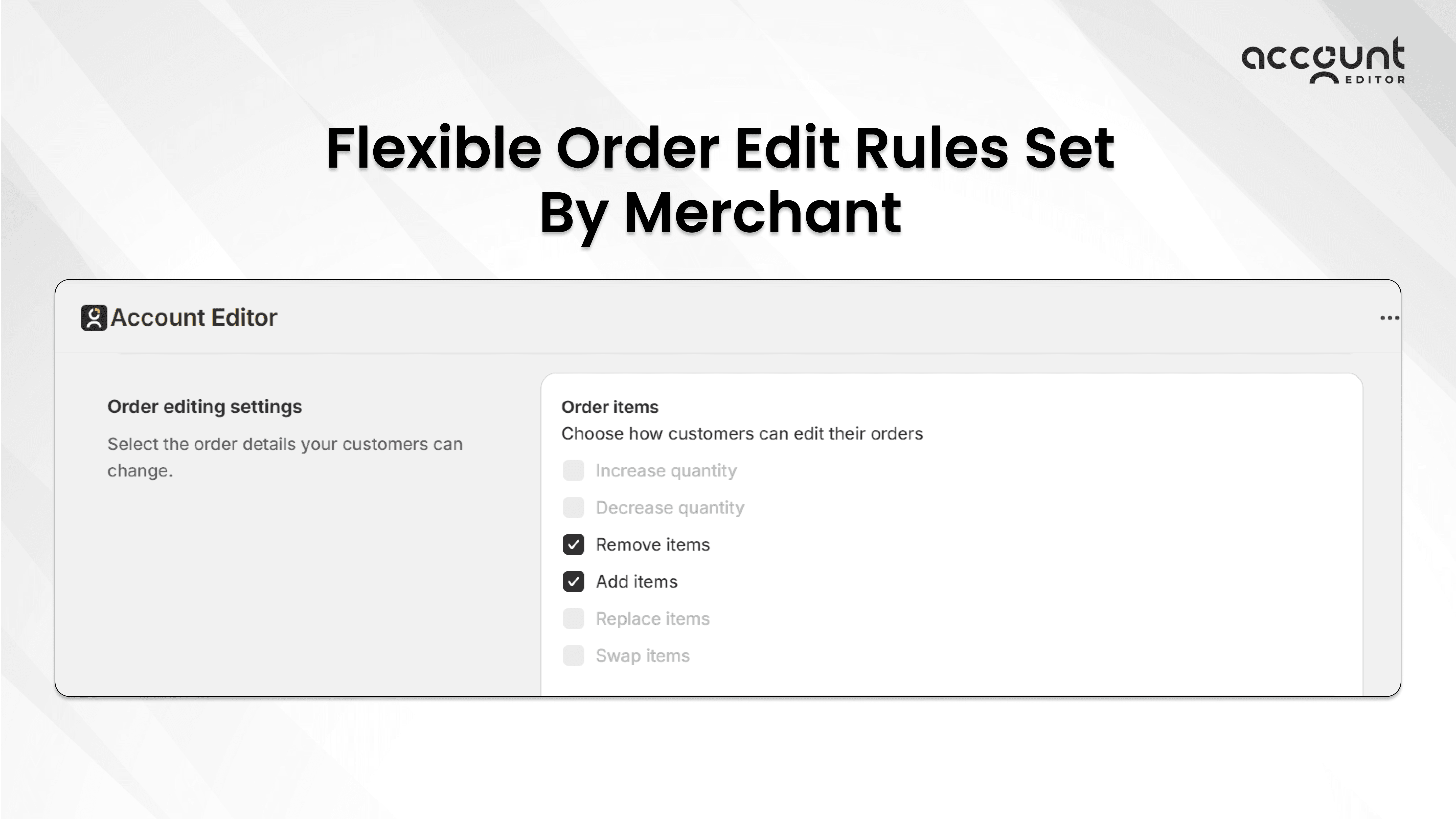
Safe edit rules define what customers are allowed to change in an order after checkout and what they are not. These rules are critical because Shopify does not provide a native way for customers to edit their orders on their own.
If you want full context on how Shopify’s native order editing works and the top merchant questions around edits, check out our comprehensive FAQ guide.
Safe edit rules help merchants offer flexibility without exposing their operations to unnecessary risk.
Flexible Order Edit Rules — You Stay in Control
Account Editor gives merchants precise control over what customers can change after checkout, so order editing never becomes a risk. Instead of allowing all edits by default, merchants can choose exactly what’s permitted, such as allowing customers to increase item quantities but not decrease them, or vice versa, depending on inventory and fulfillment needs. The same flexibility applies to product changes, where certain actions can be enabled while others are restricted or all available changes can be allowed based on the merchant's decision. This lets customers fix or improve their orders on their own, while merchants stay in control of operations, inventory, and revenue with clear, rule-based edit permissions.
Why Shopify Requires Rule-Based Control for Order Editing
Shopify is designed to protect merchants from unintended order changes once fulfillment begins. As a result, Shopify does not allow customers to make direct edits to their orders after checkout.
Without a self-serve tool, merchants must:
Receive change requests through support channels
Manually verify each request
Edit orders inside the Shopify admin
This process does not scale well and often introduces delays.
This is where tools like Account Editor become essential. Account Editor enables merchants to define safe edit rules in advance and apply them automatically after checkout. Customers can only make changes that follow those rules, and all updates stay aligned with Shopify’s fulfillment, payment, and inventory systems.
How Safe Edit Rules Protect Both Merchants and Customers
Safe edit rules create a balanced post-purchase experience.
For customers, they provide:
Immediate access to fix simple mistakes
Confidence that changes are reflected correctly
No need to wait for support replies
For merchants, they ensure:
Fulfillment workflows remain protected
High-risk products stay locked
Support teams handle fewer manual requests
According to data cited by eDesk, 67 percent of customers prefer using self-service options rather than speaking to a company representative when resolving simple issues, which explains why self-serve tools reduce support ticket volume.
This is why safe edit rules, when implemented through a self-serve order editing tool like Account Editor, are not just a convenience. They are a necessary layer of operational control for Shopify merchants.
How Merchants Should Decide Which Products Customers Can Self-Edit
Not every product should be editable after checkout. Allowing edits on the wrong items can create fulfillment issues, while blocking edits on all products can increase cancellations.
Since Shopify does not allow customers to edit orders by default, merchants can only offer product-level control through a self-serve order editing tool. This means the decision is not just about customer convenience. It is about protecting operations while still reducing post-purchase friction.
The safest approach is to separate products into two groups based on operational risk.
Products That Are Generally Safe for Customer Self-Editing
Some products can handle post-purchase changes without causing downstream issues. These are usually items that do not involve production, customization, or complex fulfillment logic.
Products that are commonly safe to allow for self-editing include:
Standard inventory products
Items that have not entered fulfillment
Products without personalization or manual handling
Typical examples are:
Ready-to-ship items
Apparel products where size or colour can be corrected
Simple single-SKU products
Orders fulfilled from a single warehouse
When these products are editable through a self-serve tool, customers can quickly fix mistakes without involving support, and merchants avoid unnecessary cancellations.
Products That Should Be Restricted from Self-Editing
Some products carry higher risk if changed after checkout. Even small edits can disrupt fulfillment, inventory allocation, or pricing logic.
Products that merchants usually restrict from self-editing include:
Custom or personalized products
Print-on-demand or made-to-order items
Subscription products tied to recurring billing
Examples include personalized gifts, print-on-demand merchandise already in production, or bulk wholesale orders with negotiated terms. Allowing self-edits on these products often leads to manual review and operational delays.
Restricting these items ensures that high-risk changes are handled intentionally instead of automatically.
Using Time-Based Rules to Control Order Editing
Time-based rules define how long customers are allowed to edit their orders after checkout. These rules are critical because order edits are only safe during a limited window, before fulfillment or processing begins.
Shopify does not provide customers with a native way to edit orders, and it also does not manage customer-facing edit deadlines. This means time-based control can only be applied through a self-serve order editing tool.
When merchants set clear editing timeframes, they protect fulfillment workflows while still giving customers a fair chance to fix mistakes.
For guidance on automating time windows and risk rules with Shopify Flow in your order editing strategy, see our detailed automation guide.
Why Editing Time Windows Matter for Fulfillment Safety
Order fulfillment often starts quickly. Warehouses batch orders, inventory is reserved, and shipping labels are generated soon after checkout.
If customers are allowed to edit orders without time limits:
Fulfillment teams may work with outdated order details
Inventory counts can become inaccurateOrders may ship with incorrect information
Time-based rules prevent these issues by ensuring customers can only make changes while it is still operationally safe. Once the window closes, editing access is automatically removed, and the order proceeds as planned. This approach removes uncertainty for both customers and fulfillment teams.
Common Editing Timeframes Merchants Use
Different businesses require different editing windows based on how quickly orders are processed.
Common timeframes merchants choose include:
30 to 60 minutes for fast-shipping or high-volume stores
24 hours for brands that batch fulfillment daily
Until fulfillment begins for made-to-order or pre-order businesses
These timeframes are not arbitrary. They are set to match internal operations such as pick and pack schedules, warehouse cutoffs, and third-party logistics timelines.
Customers see editing options only during this allowed period. After the window closes, they are guided to support instead of being allowed to make changes that could cause issues.
How Rule-Based Self-Serve Editing Reduces Order Cancellations
Many order cancellations do not happen because customers change their minds. They happen because customers notice a mistake and cannot fix it in time. When support responses are slow, or fulfillment starts quickly, customers cancel to avoid receiving the wrong item.
Since Shopify does not allow customers to edit orders on their own, merchants can only prevent this behavior by using a self-serve order editing tool that applies clear rules. Rule-based self-serve editing removes uncertainty for customers and reduces cancellation pressure for merchants.
Why Customers Cancel Orders Instead of Requesting Changes
After checkout, customers expect small mistakes to be easy to fix. When they realize they must email support and wait, confidence drops quickly.
Customers are more likely to cancel when:
They cannot update an address immediately
They are unsure whether support will respond in time
Fulfillment appears to be moving quickly
How Self-Serve Editing Changes Customer Behaviour
When customers can see and fix eligible mistakes themselves, their behavior changes.
Self-serve editing helps because:
Customers get instant confirmation that changes are saved
There is no waiting for manual approval
Customers feel more confident that their order will arrive correctly
When self-serve order editing is governed by rules, merchants reduce incoming tickets while maintaining full control over fulfillment and inventory. Tools like Account Editor enable this balance by allowing customers to fix mistakes that are safe while blocking changes that require review.
How Shopify Merchants Implement Safe Edit Rules in Practice
Once merchants understand which products should be editable and how long edits should be allowed, the next step is implementation. This is where many Shopify merchants face limitations.
Shopify is designed to protect order integrity, especially once fulfillment begins. Because of this, Shopify does not offer customers a native way to edit orders after checkout. Any customer-facing editing experience must be handled through a self-serve order editing tool that works alongside Shopify’s order system.
What Shopify Allows Natively and Where the Limitations Start
Shopify allows merchants to edit certain order details manually inside the admin, but this process is not customer-facing and does not scale well.
Without a self-serve tool:
Customers must contact support for every change
Support teams manually edit orders in the admin
Timing depends on staff availability
Fulfillment teams may already be processing the order
This manual approach increases response time and makes it harder to apply consistent rules across all orders.
Why Manual Order Editing Does Not Scale
Manual order editing works only when the order volume is low. As stores grow, this process becomes a bottleneck.
Common challenges with manual edits include:
Support backlogs during sales or peak seasons
Inconsistent decisions between team members
Higher risk of missed or incorrect changes
Increased stress on fulfillment teams
Because edits are time-sensitive, even small delays can result in cancellations or shipping errors.
Conclusion
Post-purchase mistakes are unavoidable in e-commerce. What matters is how merchants handle them. When customers cannot fix small errors quickly, cancellations become the easiest option. At the same time, allowing unrestricted order edits can create fulfillment and inventory risks.
This is why safe edit rules matter.
By deciding:
Which products can be edited
What types of changes are allowed
How long editing remains open
merchants create a post-purchase experience that balances customer flexibility with operational control.
It is also important to be clear about the foundation of this approach. Shopify does not allow customers to edit orders by default. Any customer-facing editing experience requires a self-serve order editing tool that enforces these rules automatically.
When safe edit rules are applied correctly through self-serve editing, customers fix mistakes instead of cancelling, support teams handle fewer tickets, and fulfillment workflows stay protected.
If you want to reduce cancellations caused by post-purchase errors while keeping full control over fulfillment, rule-based self-serve order editing is a practical place to start.
Tools like Account Editor help merchants apply safe edit rules without relying on manual support workflows, making it easier to let customers fix what is safe and restrict what is not.