Manual Order Changes vs Self-Serve Editing: What Actually Works for Shopify Merchants?
Every Shopify merchant eventually runs into the same post-purchase problem: a customer places an order and then realizes something is wrong. It could be a shipping address typo, a wrong variant, an extra item they forgot to add, or a rushed decision they want to fix minutes after checkout. These issues aren’t edge cases; they’re a normal part of running an eCommerce store.
What determines the impact of these issues is how the order change is handled. Some Shopify stores rely on manual order changes managed by support teams. Others allow customers to fix mistakes on their own through self-serve editing. Both approaches are used today, but they lead to very different results in terms of operational efficiency, cancellation rates, and customer satisfaction
This comparison focuses on what actually works in real Shopify stores not theory or ideal scenarios. We’ll look at how manual order changes function in practice, how self-serve editing changes the post-purchase experience, and which approach scales better as order volume grows. The goal is simple: help Shopify merchants choose an order-editing workflow that reduces friction instead of creating it.
Why Order Changes Are a Critical Post-Purchase Issue on Shopify
Order changes become a serious issue on Shopify because of how the platform handles checkout and fulfillment. Once a customer completes payment, the checkout process is closed. From that point forward, customers cannot natively edit their orders on their own. Even simple fixes like correcting a typo in the shipping address or changing a product variant require merchant intervention.
This creates a sensitive gap between checkout and fulfillment. Customers often notice mistakes shortly after placing an order, especially when shopping quickly or on mobile devices. When they realize they cannot fix the issue themselves, frustration sets in. If support does not respond quickly enough, customers may choose to cancel the order instead of waiting for a resolution.
For merchants, this post-purchase period carries operational risk. Support teams must monitor incoming order change requests while fulfillment teams prepare orders for shipment.
If communication breaks down or responses are delayed, orders can be shipped with incorrect details. Fixing these errors later usually costs more than preventing them early, whether through reshipments, refunds, or additional support time.
Order changes also affect customer trust. A smooth post-purchase experience reassures buyers that the brand is reliable and easy to work with. A slow or confusing experience does the opposite. This is why order changes are not just a minor support task but a core part of the post-purchase experience that directly influences cancellations, support workload, and long-term customer satisfaction.
What Are Manual Order Changes on Shopify?
Manual order changes on Shopify refer to any post-purchase modifications that are handled directly by the merchant or their internal team after an order has been placed. Since Shopify does not allow customers to edit their orders on their own once checkout is complete, all change requests must be processed manually through the Shopify admin.
These requests usually occur when customers notice mistakes shortly after placing an order. Common examples include incorrect shipping details, wrong product variants, quantity adjustments, or requests to remove or replace an item. In a manual setup, every one of these requests depends on human intervention, making the process reactive rather than systematic.
Manual order changes are widely used because they are the default option for most Shopify stores. However, this approach places the responsibility entirely on support and operations teams, especially during the critical window between checkout and fulfillment.
How Manual Order Changes Work in Real Shopify Stores
In real-world Shopify operations, manual order changes typically start when a customer contacts the merchant after checkout. This communication usually happens through email, live chat, or a support form. The customer explains what needs to be changed and waits for confirmation.
Once the request is received, a support team member checks the order status in the Shopify admin to confirm whether the order is still unfulfilled and eligible for changes. If it is, the team manually updates the order details. This may include editing the shipping address, changing a product variant, or adjusting item quantities.
If the requested change affects pricing, taxes, or shipping costs, additional steps are required. Support teams may need to issue partial refunds, request additional payment, or leave internal notes to prevent fulfillment from proceeding prematurely. Each step requires coordination between support and fulfillment teams to ensure the order is handled correctly.
This workflow depends heavily on timing. If the request is processed quickly and fulfillment has not begun, the change can be made smoothly. If there is a delay, the risk of errors increases.
Common Problems With Manual Order Changes
Manual order changes often create operational friction because they rely entirely on human effort. Each request must be reviewed, interpreted, and executed correctly, which increases workload for support teams and slows down response times during busy periods.
One major issue is delay. Customers expect fast resolutions after checkout, but manual workflows are limited by staff availability. When customers do not receive timely confirmation that their issue will be resolved, they may choose to cancel the order instead of waiting.
Another challenge is the risk of mistakes. Manual edits require switching between systems, copying information, and coordinating with fulfillment teams. Even small errors can result in incorrect shipments, leading to returns, reshipments, or refunds.
Finally, manual order changes do not scale well. As order volume grows, the number of change requests increases proportionally. This adds pressure on support teams and makes the post-purchase experience inconsistent. Over time, manual handling becomes harder to sustain without increasing operational costs or sacrificing customer satisfaction.
What Is Self-Serve Order Editing?
Self-serve order editing is a post-purchase workflow, enabled through Shopify apps, that allows customers to make approved changes to their orders on their own after checkout and before fulfillment. Instead of contacting support, customers can update eligible order details through a controlled interface provided by the merchant.
This approach exists because Shopify closes checkout once payment is completed. Without self-serve editing, customers have no direct way to correct mistakes. With self-serve editing enabled, merchants define clear rules around what can be edited and how long edits are allowed, while customers get immediate control during that window.
How Self-Serve Order Editing Works on Shopify
On Shopify, self-serve order editing is implemented through post-purchase order editing apps. These apps integrate with the order status page or customer account area and become available immediately after checkout.
Merchants first define an edit timeframe. This could be a short window, such as 30 minutes or a few hours, or it could remain open until the order is fulfilled. Within this timeframe, customers are shown an option to edit their order. Once the window closes or fulfillment begins, editing is automatically disabled.
Merchants also control which parts of the order can be changed. This ensures that self-serve editing does not interfere with inventory rules, fulfillment logic, or business-specific restrictions. Because edits happen within predefined limits, fulfillment teams can rely on consistent order data once the edit window closes.
For a deeper look at how post-purchase order edits work in real workflows, see our post-purchase order editing playbook.
What Customers Can Edit After Checkout
What customers can edit depends entirely on the rules set by the merchant. In most Shopify stores that enable self-serve editing, customers are allowed to fix the most common post-purchase mistakes without contacting support.
Typical editable elements include shipping address details, contact information, product variants, and item quantities. Some merchants also allow customers to add or remove items, or cancel an order, as long as the order has not entered fulfillment.
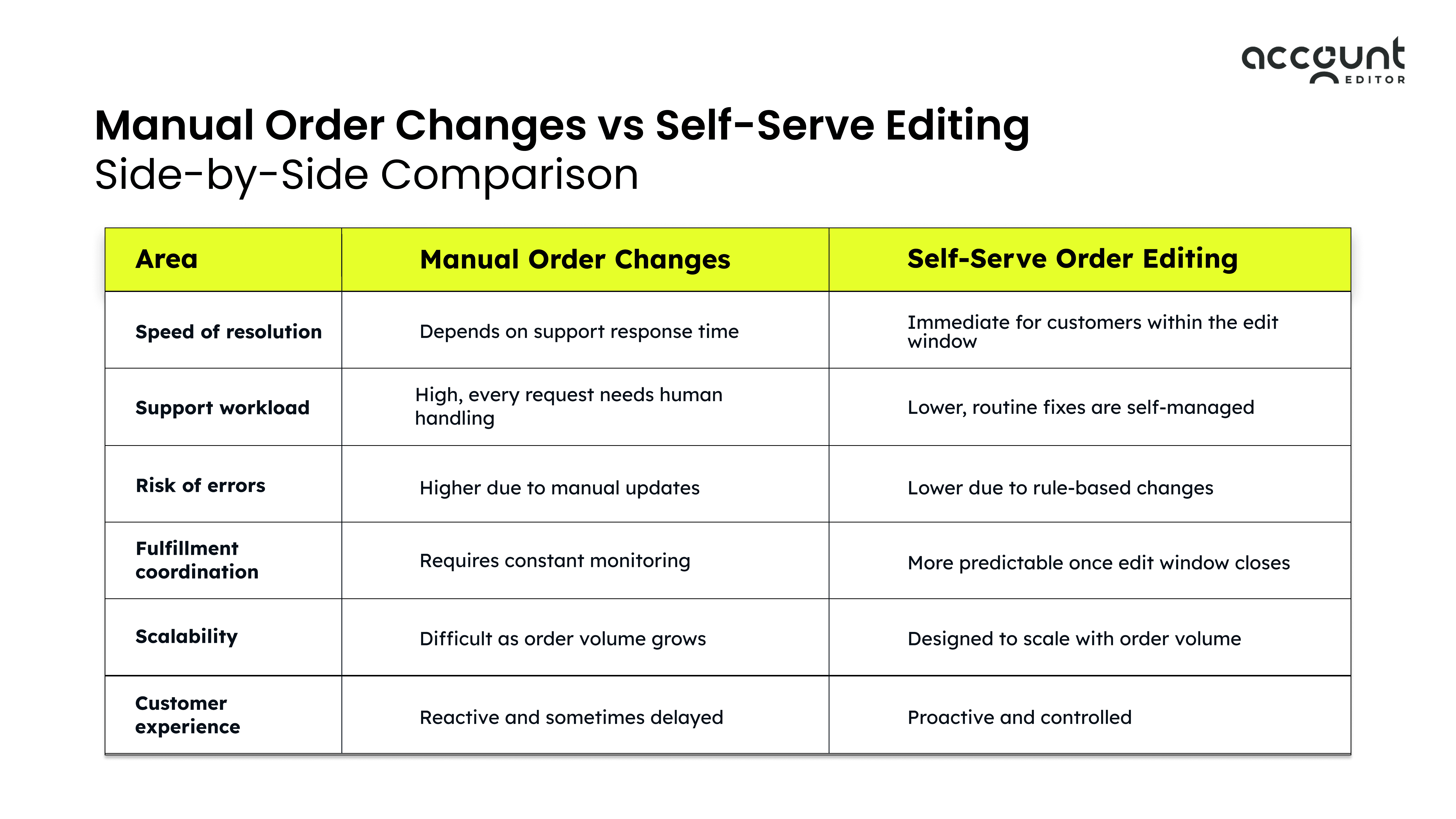
Manual Order Changes vs Self-Serve Editing Side-by-Side Comparison
The difference between manual order changes and self-serve editing becomes clear when you compare how each approach affects daily operations, support workload, and customer experience. Both methods allow post-purchase changes, but they do so in very different ways.
Manual order changes depend on support teams reacting to individual requests. Self-serve editing, on the other hand, follows predefined rules and allows customers to resolve common issues on their own. This distinction has a direct impact on speed, accuracy, and scalability.
Real-World Order Change Scenarios Shopify Merchants Face
Order change requests usually follow clear patterns. They are not random or rare events. Most Shopify merchants see the same types of issues repeated across orders, especially shortly after checkout. Understanding these scenarios helps explain why the way order changes are handled matters so much.
1. Shipping Address Changes After Checkout
Shipping address errors are one of the most common post-purchase issues. Customers often notice missing apartment numbers, incorrect postal codes, or outdated delivery addresses minutes after placing an order. This is especially common for mobile shoppers and repeat customers who rely on saved information.
When these requests are handled manually, speed becomes critical. If fulfillment starts before the correction is made, the order may ship to the wrong address. Fixing this later often requires reshipping the order or processing a refund, both of which increase operational cost and customer frustration. Address changes are usually simple to resolve, but only if they are caught early.
2. Product Swaps and Quantity Updates
Another frequent scenario involves customers realizing they selected the wrong variant or quantity. This includes choosing the wrong size, color, or pack option, or needing to add or remove items shortly after checkout.
These changes are typically time-sensitive. Customers expect quick confirmation that the order will be updated correctly. When handled manually, support teams must verify inventory, adjust the order, and manage any pricing differences. Delays or errors in this process often lead customers to lose confidence and request cancellations instead.
3. Last-Minute Order Cancellations
Many order cancellations happen not because customers no longer want the product, but because they believe a mistake cannot be fixed in time. When customers do not see a clear way to correct an order issue, cancellation feels like the safest option.
This behavior is well documented in e-commerce UX research. Studies from Baymard Institute show that a lack of clarity and perceived control during critical purchase moments increases customer anxiety and abandonment-related behavior, which often carries over into post-purchase decision-making.
Impact on Support Teams and Store Operations
Manual order changes place ongoing pressure on both support teams and operational workflows. Each post-purchase request requires fast attention and usually involves repetitive tasks such as address updates, item changes, or cancellation handling.
Support data from eCommerce helpdesk platforms shows that order-related issues make up a large portion of customer inquiries for Shopify stores. According to Gorgias, order changes and cancellations are among the most common support ticket categories in eCommerce. Because these requests are time-sensitive, they often take priority over other support tasks, increasing response pressure on teams.
The impact extends to fulfillment operations as well. Fulfillment teams depend on stable order data to ship accurately and on time. When manual order changes are pending or communicated late, teams must pause shipments or double-check orders, which slows fulfillment and increases the risk of errors.Unclear or delayed order changes often contribute to WISMO (‘Where Is My Order’) inquiries, as customers seek confirmation that updates were applied correctly. Self-service workflows reduce this uncertainty by giving customers immediate visibility and control.
Impact on Customer Experience and Retention
Order changes directly shape how customers perceive a brand after checkout. This post-purchase phase is often the first moment when customers test how responsive and reliable a store really is. When changes are difficult or slow to resolve, confidence drops quickly.
Customers expect quick reassurance after reporting an issue. If they have to wait for support confirmation or repeat their request multiple times, frustration builds. Research shows that 32 % of customers stop doing business with a brand after just one bad experience, even if they like the product. Post-purchase friction, especially around order mistakes, is a common trigger for this behavior.
Lack of control also plays a role. Baymard Institute’s research highlights that uncertainty after checkout increases anxiety and abandonment-related actions. When customers feel unsure whether an issue will be resolved before shipping, they are more likely to cancel the order rather than risk receiving the wrong item.
A smoother post-purchase experience improves both confidence and retention. When customers feel their order can be corrected quickly and transparently, merchants see clear benefits such as:
Fewer support follow-ups for the same issue
Lower cancellation rates caused by anxiety or uncertainty
Higher likelihood of repeat purchases
Why Self-Serve Editing Helps Reduce Order Cancellations
Many order cancellations are not driven by dissatisfaction with the product, but by uncertainty after checkout. Customers often realize small mistakes shortly after placing an order. When they do not see a clear way to fix those mistakes, cancelling the order feels like the safest option.
Self-serve editing reduces cancellations by removing this uncertainty. Instead of waiting for support confirmation, customers can immediately correct issues within a defined window. This sense of control plays a critical role in customer decision-making during the post-purchase phase.
Baymard Institute’s research further supports this behavior. Their findings show that a lack of clarity and control during and after checkout increases abandonment-related actions, including cancellations.
There are three key reasons self-serve editing lowers cancellation rates:
Customers can fix errors instantly, which reduces panic-driven decisions
Clear edit rules set expectations and prevent confusion
Faster resolution builds confidence that the order will be fulfilled correctly
How Shopify Merchants Use Account Editor for Self-Serve Order Editing
This is where many Shopify merchants move from reactive manual handling to a controlled self-serve workflow using tools like Account Editor. By this point, the problem is already clear. Order changes are frequent, time-sensitive, and costly when handled manually, especially as order volume grows.
Account Editor is used as a post-purchase layer that sits between checkout and fulfillment. Merchants configure clear rules around when order edits are allowed and what customers can change. Within those boundaries, customers can resolve common issues themselves instead of contacting support, while merchants maintain control over risk and fulfillment timing.
In day-to-day operations, Shopify merchants use Account Editor to handle common post-purchase scenarios in a structured way, including:
Allowing customers to correct shipping address errors before fulfillment begins
Enabling product variant or quantity updates within a defined edit window
Letting customers cancel orders early when fulfillment has not started
When Manual Order Changes Still Make Sense
Manual order changes are still necessary in certain situations where automated edits could create risk. Orders that have already entered fulfillment often require manual review to avoid shipping errors or inventory issues.
Manual handling is also appropriate for custom or made-to-order products, where changes may affect production or supplier workflows. The key distinction is intent. Manual order changes work best when they are used for complex or high-risk cases, not for routine post-purchase fixes that could be handled more efficiently through controlled self-service.
How to Choose the Right Order Editing Approach for Your Shopify Store
The right order editing approach depends on how frequently customers request changes and how quickly orders move to fulfillment. Stores with low order volume or highly customized products may manage manual changes effectively, but this becomes harder as volume increases.
If routine order changes take up a significant amount of support time or lead to delays and cancellations, self-serve editing can reduce pressure while maintaining control. Many Shopify merchants benefit from a hybrid approach, using self-serve editing for common, low-risk changes and manual handling for complex cases. This balance supports scalability without sacrificing accuracy.
Final Thoughts
Order changes are not an exception in e-commerce. They are a predictable part of the post-purchase experience. What determines their impact is how they are handled. Manual order changes can work in limited, complex scenarios, but relying on them for routine fixes creates delays, increases support workload, and raises the risk of cancellations.
Self-serve editing addresses these challenges by giving customers controlled flexibility at the moment it matters most. When customers can correct mistakes quickly and clearly, uncertainty drops, cancellations decrease, and internal teams regain operational focus.
For Shopify merchants, the most effective approach is rarely all manual or fully hands-off. A structured balance works best. Routine, low-risk changes are handled through self-service, while complex cases remain under manual review. This model scales better, protects fulfillment workflows, and improves the overall customer experience.
For stores experiencing frequent post-purchase errors or rising support pressure, moving toward controlled self-serve editing with Account Editor.