Ever had a customer order the wrong size or enter the wrong address and then watch your support inbox explode? Post-purchase mistakes like these aren’t just annoying; they cost time, money, and customer trust.
Shopify’s native order editing offers a fix, but is it enough to keep your operations smooth and your customers happy? Or is a dedicated Shopify order editing app the secret to truly seamless self-service order editing?
In this blog, we’ll reveal the real differences between native editing and apps, explore their limitations and benefits, and show how letting customers edit orders can reduce errors, improve satisfaction, and save your team countless headaches.
What Problems does Native Editing has and what’s the Solution
Post-purchase errors such as wrong variants, forgotten add-ons, or incorrect shipping details can quickly disrupt operations. Shopify’s native order editing allows merchants to make basic updates to unfulfilled orders, such as adding or removing items or adjusting quantities, but these changes must be handled from the admin. Since customers can’t edit their own orders natively, even small corrections often require manual intervention, leading to additional support tickets and slower fulfillment.
Common Problems with Shopify Native Order Editing:
Limited Editing Options: Shopify only allows edits to unfulfilled items. Variant swaps require removing the item and adding the correct variant manually. Add-ons, delivery method changes, and post-fulfillment edits aren’t supported.
Manual Merchant Intervention: All changes must be done by the merchant inside the Shopify admin. This slows fulfillment and increases the chance of errors.
No Self-Service Portal: Customers cannot update size, shipping address, or items themselves, which leads to unnecessary support tickets.
High Support Load: Simple corrections (wrong size, incorrect ZIP code, missed product) become backend tasks, increasing operational costs.
Limited Automation: Shopify does not offer automated approval rules, cut-off times, or synced workflows. After an edit, merchants must manually handle refunds or additional charges.
Example:
A customer orders a Medium T-shirt but meant to choose Large. Using native editing, the merchant must manually remove the Medium, add the Large, adjust totals, and possibly issue a refund, all before fulfillment. If the order is fulfilled or partially fulfilled, editing is no longer allowed.
How Order Editing Apps Solve These Problems:
Allow customers to edit size, color, add-ons, and shipping details directly through a self-service Shopify customer portal.
Automatically sync changes with inventory and fulfillment workflows, reducing mis-shipments and overselling.
Reduce support tickets by letting customers fix the most common mistakes themselves.
Deliver a more flexible, faster, and frustration-free post-purchase experience.
In short, while Shopify’s native order editing is a starting point, its limitations become clear as stores grow. A dedicated Shopify order editing app is essential to streamline post-purchase changes, reduce support workload, and deliver a seamless, self-service experience that keeps customers happy and operations efficient.
Understanding Shopify Native Order Editing
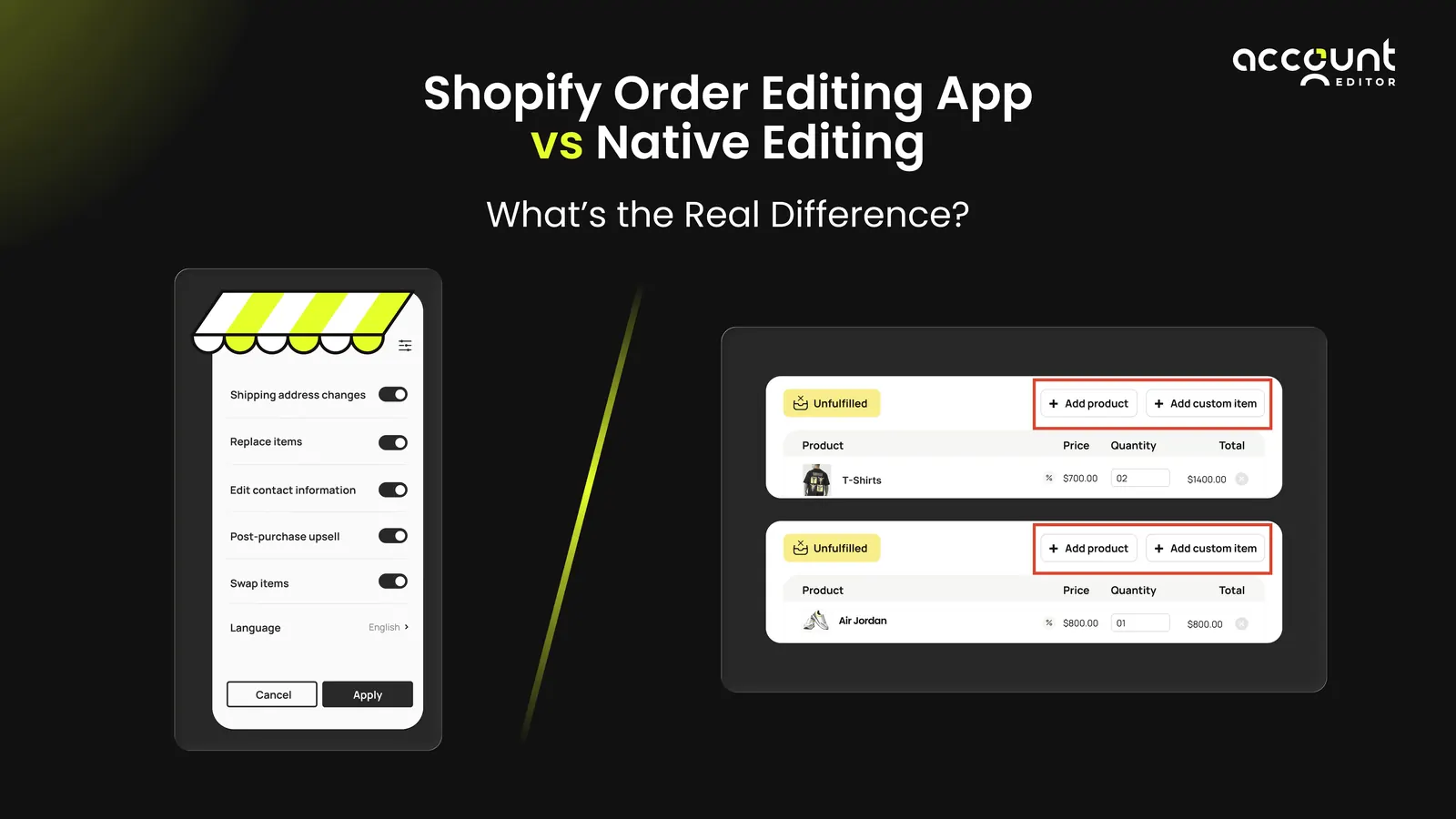
Shopify’s native order editing feature gives merchants the ability to correct simple order mistakes after a purchase, but its functionality is limited. While it works well for basic adjustments like changing quantities or adding/removing products, it lacks automation and does not allow customers to self-edit their orders. For growing stores, these constraints can lead to extra manual work, slower fulfillment, and unnecessary customer support requests, which is why many merchants look for dedicated order editing apps.
What Shopify Native Editing Can Do
Add or remove products from an order before fulfillment.
Adjust item quantities (increase or decrease) while the order is still unfulfilled.
Apply or modify manual discounts before fulfillment.
Edit shipping details or fees in certain cases when adjustments affect order totals.
These capabilities make Shopify’s built-in editor useful for basic corrections, such as a customer ordering the wrong quantity or forgetting an item.
Limitations of Shopify Native Order Editing
No customer self-service: Only merchants can edit orders from the Shopify admin.
No direct variant swap: You cannot simply change size/color; you must remove the existing item and add the correct variant manually.
No edits after fulfillment: Once an item is fulfilled or shipped, the order cannot be modified natively.
Limited automation: No rules, cut-off times, approval workflows, or dynamic inventory-based logic.
Merchant Pain Points With Native Editing
Slower fulfillment: Manual intervention delays processing and increases operational steps.
Higher staffing costs: Teams spend time manually updating orders instead of automating changes.
Increased support tickets: Customers must contact support for even minor corrections.
Customer frustration and avoidable returns: If shoppers can’t easily fix mistakes, they often cancel or return orders instead.
Bottom Line
Shopify’s native order editing covers the essentials, but its lack of automation, post-fulfillment flexibility, and customer self-service creates friction as stores scale. For brands that want a seamless, fully automated, and customer-first experience, dedicated Shopify order editing apps like Account Editor are often the smarter choice.
What Shopify Order Editing Apps Offer
Shopify order editing apps like Account Editor go far beyond the basic native features, giving both merchants and customers the flexibility modern eCommerce demands. From full self-service control to automation and operational efficiency, these apps transform post-purchase management.
True Customer Self-Service
Let customers edit size, color, quantity, shipping address, or even cancel orders instantly
Provide a clean Shopify customer portal for post-purchase order updates
Empower shoppers to fix mistakes without contacting support, improving satisfaction and loyalty
Automation & Rules
Set cut-off times to maintain fulfillment accuracy
Define which items or variants are editable to prevent errors
Automatically sync changes with inventory and fulfillment workflows
Post-Purchase Experience Optimization
Enable quick post-purchase corrections for a frictionless shopping experience
Create upsell opportunities by letting customers add missed items or add-ons
Reduce preventable returns and shipping errors, saving costs and boosting efficiency
Support & Operational Benefits
Reduce support tickets in Shopify stores by 30–50%
Streamline fulfillment workflows for faster delivery
Improve overall operational efficiency for e-commerce operations
With these features, Shopify order editing apps don’t just fix mistakes; they give customers control, reduce support workload, and keep your operations running smoothly. Unlike native editing, apps turn post-purchase changes from a headache into a seamless, revenue-friendly process, making them essential for growing Shopify stores. For more details on how customers can edit orders after they’ve been placed in Shopify, check out our dedicated guide here
Direct Comparison – Native Editing vs Apps
Shopify’s built-in editing tools are helpful for very small stores, but they lack the flexibility and automation that scaling brands need. As order volumes grow, native editing quickly becomes restrictive and forces teams to rely heavily on manual support. A dedicated order editing app for Shopify fills these gaps with automation, self-service, and far greater control over post-purchase changes
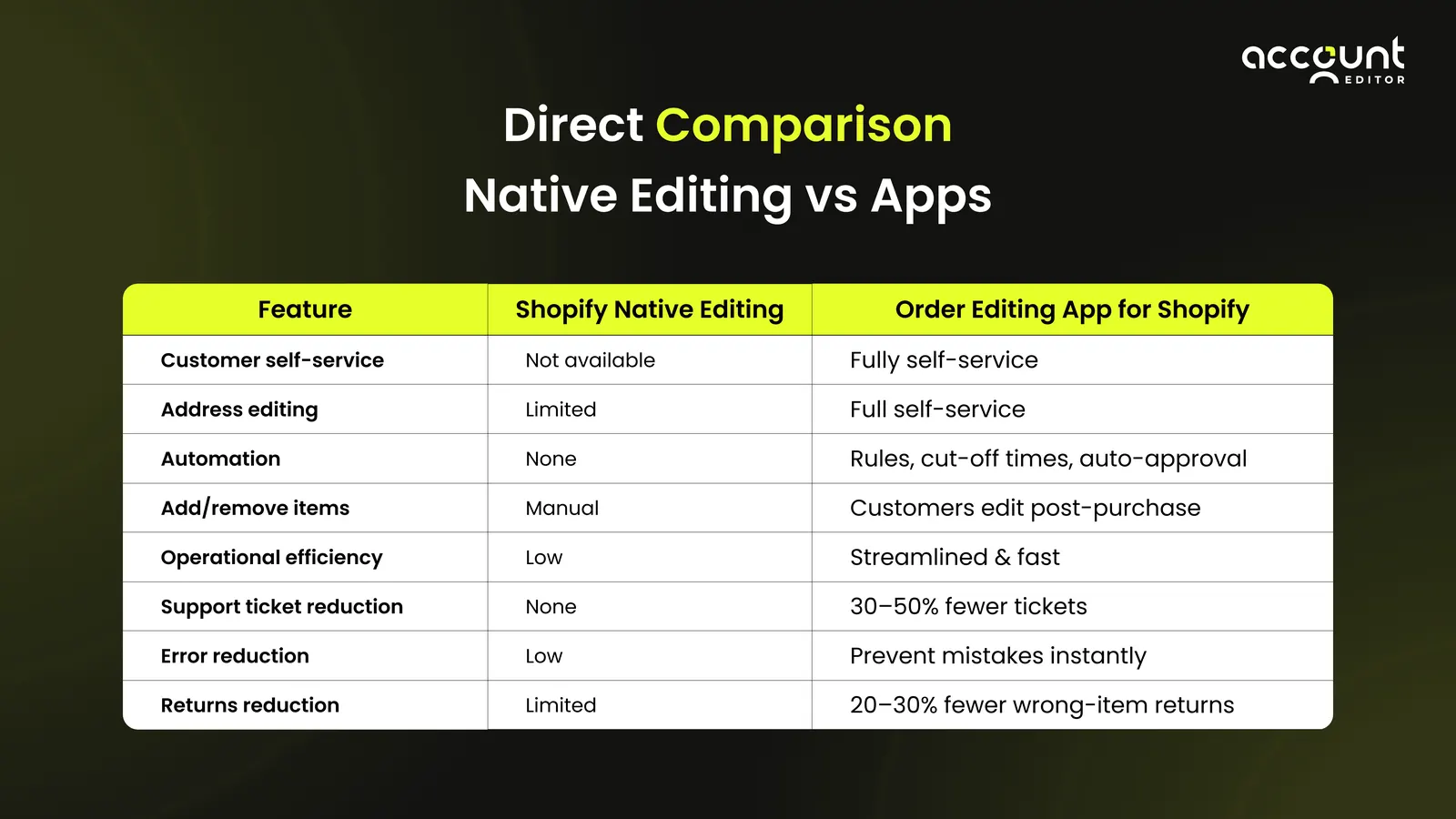
A dedicated app doesn’t just “add more features”, it transforms the entire post-purchase workflow. Customers fix issues instantly, support teams stay free from repetitive queries, and fulfillment teams get cleaner, more accurate orders.
When Apps Make Sense for Shopify Stores
Order editing apps become essential, not optional, once manual fixes start slowing operations and overwhelming support teams. They’re especially valuable for stores where every wrong size, missed add-on, or address error hurts customer satisfaction and fulfillment speed.
As order volume grows, native editing quickly becomes a bottleneck; apps step in to keep everything smooth, automated, and scalable.
Stores with frequent edits or returns
High volume of post-purchase support tickets
Scaling operations without increasing support staff
A dedicated order editing app for Shopify streamlines post-purchase order changes, reduces support tickets, and improves accuracy. With self-service order editing and automated fixes, AccountEditor keeps customers happy and operations running smoothly, making scaling your store effortless.
Real Merchant Scenarios, Impact of Self-Service Order Editing
Post-purchase mistakes happen every day, but the way they’re handled can make or break the customer experience. Self-service order editing for Shopify turns potential headaches into smooth, frictionless solutions. Here are real-world scenarios every merchant can relate to:
Scenario 1: Wrong Size Ordered
A customer buys a Medium hoodie but meant to select Large.
With a self-service order editing app, they can instantly update the size or variant without contacting support.
This prevents potential returns, avoids fulfillment delays, and enhances customer satisfaction on Shopify.
Scenario 2: Incorrect Shipping Address
A shopper accidentally enters the wrong ZIP code during checkout.
Through the Shopify customer portal for order updates, they can correct the address immediately after purchase.
This action helps prevent 12–18% of delivery failures, reduces operational headaches for warehouse teams, and improves the overall post-purchase experience.
Takeaway: Allowing customers to fix mistakes themselves not only reduces support tickets Shopify stores typically face but also strengthens trust, loyalty, and operational efficiency. It empowers shoppers with control over their orders, creates a seamless post-purchase experience, and ultimately drives repeat purchases and long-term customer satisfaction.
Real Merchant Scenarios, Impact of Self-Service Order Editing
Post-purchase mistakes happen every day, but the way they’re handled can make or break the customer experience. Self-service order editing for Shopify turns potential headaches into smooth, frictionless solutions. Here are real-world scenarios every merchant can relate to:
Scenario 1: Wrong Size Ordered
A customer buys a Medium hoodie but meant to select Large.
With a self-service order editing app, they can instantly update the size or variant without contacting support.
This prevents potential returns, avoids fulfillment delays, and enhances customer satisfaction on Shopify.
Scenario 2: Incorrect Shipping Address
A shopper accidentally enters the wrong ZIP code during checkout.
Through the Shopify customer portal for order updates, they can correct the address immediately after purchase.
This action helps prevent 12–18% of delivery failures, reduces operational headaches for warehouse teams, and improves the overall post-purchase experience.
Takeaway: Allowing customers to fix mistakes themselves not only reduces support tickets Shopify stores typically face but also strengthens trust, loyalty, and operational efficiency. It empowers shoppers with control over their orders, creates a seamless post-purchase experience, and ultimately drives repeat purchases and long-term customer satisfaction. For more insights on why every Shopify store should offer self-service order editing, check out our guide here.
Why Shopify Stores Need an Order Editing App
While Shopify’s native order editing handles only the basics, ambitious stores quickly discover its limitations. A powerful order editing app for Shopify, named Account Editor , goes beyond simple tweaks, giving merchants full control, empowering customers with self-service order editing, and transforming post-purchase headaches into smooth, scalable operations.
Reduce support workload Shopify store: With self-service order editing enabled, customers can fix mistakes themselves (wrong size, missing item, wrong address, etc.), which cuts down on repetitive support tickets.
Improve post-purchase experience: Allowing shoppers to edit orders (items, quantities, shipping method/address, etc.) after purchase, within a merchant-defined window, boosts convenience, satisfaction, and loyalty.
Streamline operations: Advanced editing apps often automatically sync changes to inventory, shipping, and fulfillment workflows. This helps reduce mistakes that occur when edits are handled manually and speeds up fulfillment.
Investing in a dedicated order editing app for Shopify like Account Editor lets your store scale effortlessly, while delivering a seamless post-purchase order changes experience that keeps both your team and customers delighted. For more insights on why every Shopify store should offer self-service order editing, check out our guide here.
Conclusion
While Shopify native order editing handles basic tweaks, growing stores need more flexibility and efficiency. A dedicated order editing app for Shopify like Account Editor transforms post-purchase order changes into a smooth, automated, and customer-friendly process. Key benefits include:
Empower Customers: Enable self-service order editing so shoppers can fix wrong sizes, update shipping details, or add missed items.
Reduce Support Load: Cut repetitive tickets and free up your team to focus on growth.
Prevent Errors: Automate updates to inventory, shipping, and fulfillment for greater accuracy.
Streamline Operations: Keep orders moving quickly, even at high volumes, without adding staff.
Boost Satisfaction & Loyalty: A seamless post-purchase experience strengthens trust and encourages repeat purchases.
Bottom Line: Moving beyond native editing isn’t optional for growing Shopify stores, it’s essential. With Account Editor, you can scale effortlessly, reduce mistakes, and keep both customers and your team happy, turning post-purchase headaches into a competitive advantage
Transform Your Post-Purchase Experience Today. Try Account Editor Now!