The Moment Customers Realize Something Went Wrong
A customer places an order and feels confident about the purchase.
A few minutes later, they notice a problem.
It could be the wrong shipping address.
It could be the wrong size or quantity.
Or they might have forgotten to add an item.
Their first reaction is simple:
“I’ll just fix it.”
But when they go back to the store, they quickly realize there’s no clear option to edit the order.
Why This Moment Matters for Shopify Merchants
After checkout, Shopify does not allow customers to change their orders on their own. Even small mistakes usually mean the merchant has to step in manually.
If customers don’t get help fast, they often choose the easiest path, canceling the order.
That’s why post-checkout mistakes quietly lead to:
More support emails
More order cancellations
More refunds
Frustrated customers
Understanding what happens after checkout is the first step to fixing this problem and keeping customers from leaving.
Why Post-Checkout Mistakes Are So Common on Shopify
Post-checkout mistakes happen on Shopify stores every day. In most cases, customers don’t notice the mistake until after the order is placed. Once payment is completed, customers slow down and review their order. That’s when small issues like a wrong address or product choice become clear. By then, Shopify does not allow customers to edit their orders on their own, which often leads to frustration.
1. Mobile Shopping Adds to the Problem
Many orders are placed on mobile devices. Smaller screens make it harder to review addresses, product options, and quantities. Customers scroll quickly and trust autofill to work correctly.
After checkout, fixing mistakes is not simple. Customers either contact support or cancel the order. A self-serve editing app helps reduce this friction by allowing controlled changes.
2. Customers Expect Flexibility After Checkout
Shoppers today expect to make small changes after purchase. When they find out they cannot edit their order, it feels unexpected. Instead of waiting for help, many customers cancel the order to avoid risk.
This expectation gap is one of the main reasons merchants use order editing to protect orders and customer trust.
3. Small Mistakes Feel Risky After Payment
Before checkout, changes feel easy. After payment, even a small mistake feels serious. Customers worry about wrong deliveries or delays and choose what feels safest, canceling the order.
Giving customers a controlled way to fix mistakes after checkout reduces this fear and keeps orders from being canceled unnecessarily.
Most Common Customer Mistakes After Checkout
When customers make mistakes after checkout, the issues are usually simple. These are not complex problems, but because Shopify does not allow customers to edit orders on their own, even small errors can quickly turn into cancellations.
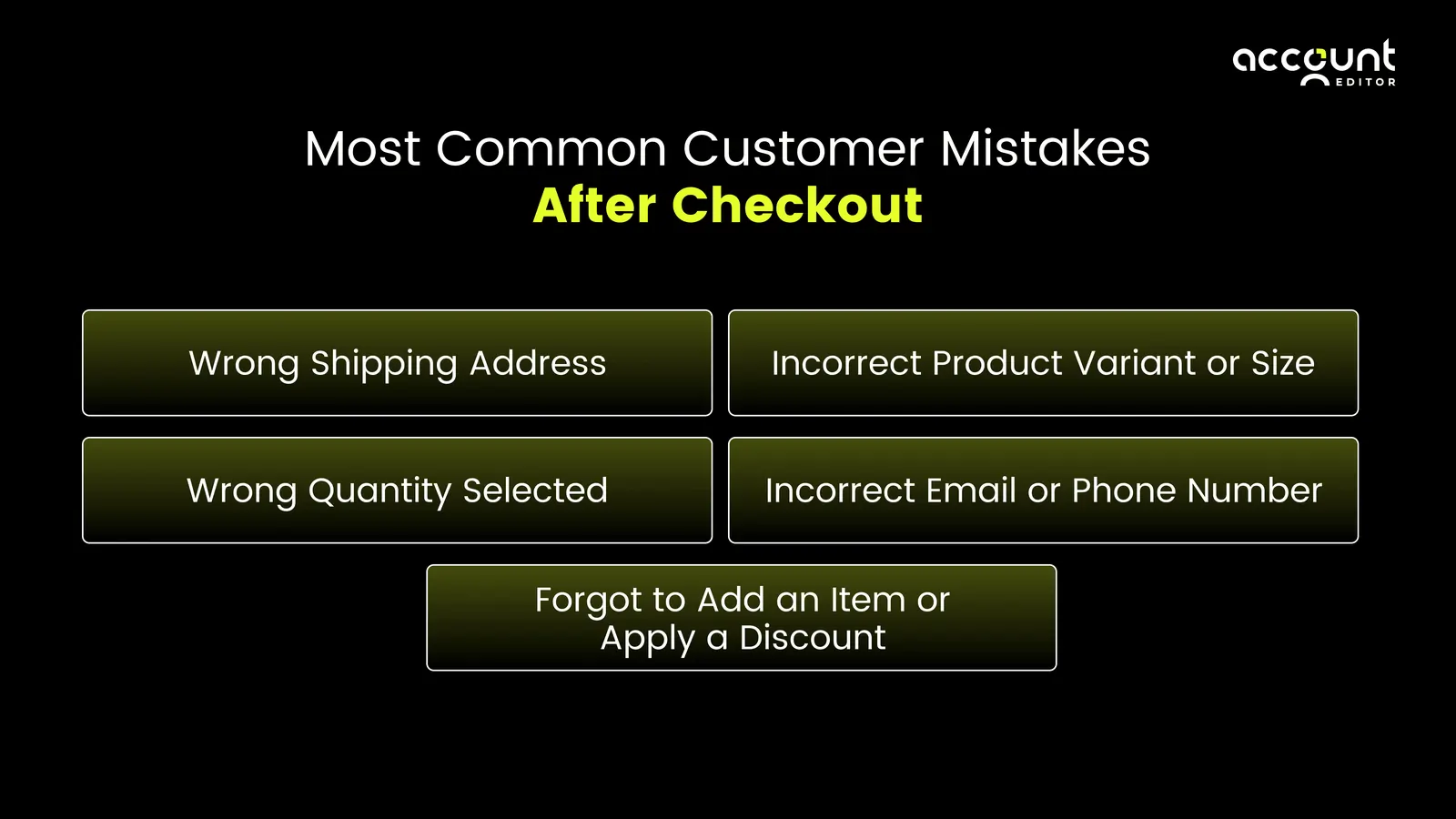
Most post-purchase problems fall into a few clear patterns.
1. Wrong Shipping Address
This is the most common mistake merchants face. Customers often forget to update an old address, miss an apartment number, or notice a typo only after the order confirmation arrives.
Once the order is placed, customers cannot fix the address themselves. If fulfillment starts quickly, customers worry the order will ship to the wrong location and often cancel to avoid the risk.
2. Incorrect Product Variant or Size
Customers sometimes choose the wrong size, color, or option, especially when shopping quickly or on mobile. The mistake usually becomes clear after they review the order confirmation.
Because Shopify locks the order after checkout, customers cannot swap variants on their own. Without a fast solution, many customers cancel the order instead of waiting for support to respond.
3. Wrong Quantity Selected
Quantity mistakes happen when customers rush through checkout or reorder items they bought before. Ordering too many or too few items may seem like a small issue, but it often leads to immediate concern after payment.
Since customers cannot change quantities themselves, they often request a cancellation rather than risk receiving the wrong order.
4. Incorrect Email or Phone Number
A wrong email address or phone number can prevent customers from receiving order updates, shipping notifications, or delivery alerts. Customers usually notice this mistake only after checkout.
When they realize they cannot update contact details on their own, they worry about missing important updates and reach out to support or cancel the order.
5. Forgot to Add an Item or Apply a Discount
Customers often realize they forgot to add an item or missed applying a discount code after checkout. While they still want the order, they don’t want to place a second one or pay extra shipping.
Without a way to update the existing order, customers may cancel and reorder, creating extra refunds, inventory issues, and support work for merchants.
Why this matters for merchants?
Each of these mistakes is small on its own. But when customers cannot fix them easily, they turn into cancellations, refunds, and support tickets. This is why many merchants look for an order editing app to handle post-purchase changes in a controlled way and reduce avoidable order loss.
What Actually Happens After Checkout?
Once a customer completes checkout on Shopify, the order immediately moves into processing. At this stage, Shopify treats the order as confirmed and paid, which means most details are locked by default.
This is an important moment for merchants to understand, because it explains why even small customer mistakes become difficult to fix after purchase.
1. Orders Are Locked After Payment
After checkout, Shopify assumes the order is ready to be prepared for shipping. This helps protect payment security, inventory accuracy, and fulfillment speed.
Because of this, customers cannot:
Change their shipping address
Edit items, variants, or quantities
Add new products to the order
From the customer’s point of view, this feels restrictive. From Shopify’s point of view, it prevents errors during fulfillment.
2. Merchants Can Edit Orders From the Admin
Shopify does allow merchants to make limited changes from the admin panel, but these edits are not always simple.
Depending on the order status, merchants may be able to:
Update the shipping address before fulfillment starts
Adjust items in specific situations
Issue refunds or collect additional payment
These changes require manual work and careful review. They also depend on whether fulfillment has already begun.
Shopify explains in its official documentation that orders are effectively locked for customers after checkout, with limited edit options available only to merchants in the admin, a design choice intended to protect payment accuracy, inventory tracking, and fulfillment workflows.
3. Customers Cannot Fix Mistakes on Their Own
One of the biggest challenges is that Shopify does not give customers a way to fix mistakes themselves after checkout.
If a customer notices an issue, their only options are:
Contact support and wait for help
Cancel the order and place a new one
This lack of self-service is why many merchants experience high volumes of post-purchase support tickets and cancellation requests.
4. Why Shopify Is Designed This Way
Shopify is built to support a wide range of fulfillment workflows at scale. Locking orders after checkout helps reduce operational risk by keeping inventory counts, payments, and fulfillment processes consistent once an order is placed.
While this design keeps operations stable, it also creates friction when customers make small mistakes. That gap between operational safety and customer flexibility is where post-purchase order editing apps come into play.
What Shopify Does NOT Support Natively After Checkout?
Shopify is designed to keep orders stable once payment is completed. For this reason, the platform intentionally limits what can be changed after checkout.
These limits are clearly documented by Shopify and are meant to protect payment accuracy, inventory tracking, and fulfillment workflows.
Understanding these boundaries is important for merchants, because many post-checkout issues come from expecting Shopify to behave differently than it is designed to.
1. Customers Cannot Edit Orders After Checkout
Shopify does not allow customers to edit their orders after checkout. Once payment is completed, customers cannot update their shipping address, change items, adjust quantities, or add new products on their own.
Any post-checkout change must be handled by the merchant from the Shopify admin. This behavior is confirmed in Shopify’s official order editing documentation, which explains that edits are an admin-only action and not available to customers.
2. Shopify Does Not Offer a Native Editing Window for Customers
Shopify does not provide a built-in time window where customers can fix mistakes immediately after checkout. Even if an order was placed moments ago, it is treated as confirmed and paid.
From Shopify’s perspective, this prevents issues such as inventory being oversold, payments becoming inconsistent, or fulfillment being delayed.
However, it also means merchants cannot natively offer a short “grace period” for customer edits without manual intervention.
This behavior aligns with Shopify’s design principle of locking orders once payment is processed. Shopify consideration
3. Limited Native Cancellation Controls
Shopify does not provide built-in, customer-facing controls for managing order cancellations after checkout. Merchants cannot natively define self-service cancellation windows or automatic restocking fees for customers. As a result, most cancellation requests are handled manually by support teams through the Shopify admin, often requiring refunds and follow-up communication.
Learn how to set order cancellation rules and restocking fees in this Help Center guide.
4. Shopify Does Not Natively Support Adding Items After Checkout
Shopify does not allow customers to add new products to an existing order after checkout through the order status page. If a customer forgets an item, the standard options are to place a new order or request changes from the merchant.
While Shopify supports post-purchase experiences through apps and extensions, this functionality is not available by default in the core platform.For a deeper explanation, explore our complete guide on Shopify native editing vs order editing.
The Real Business Impact of Post-Checkout Mistakes
Post-checkout mistakes may seem minor, but they create real business problems for merchants. When customers cannot fix mistakes easily, those issues quickly affect revenue, operations, and customer trust.
1. Higher Order Cancellations
When customers notice a mistake and don’t see a clear way to fix it, many choose to cancel the order. Canceling feels safer than waiting for support, even if they still want the product. Over time, these avoidable cancellations reduce overall sales.
2. Increased Refund and Payment Handling
Canceled orders usually mean refunds. Each refund requires payment processing, accounting updates, and reconciliation. As cancellations increase, merchants spend more time handling refunds instead of focusing on growth.
3. More Support Requests
Address changes, item swaps, and quantity errors are some of the most common support requests after checkout. Without a self-serve option, every request must be handled manually, increasing workload and slowing response times.
4. Fulfillment Delays and Errors
Manual changes can slow down fulfillment or lead to mistakes if updates are missed. Orders may ship before corrections are applied, resulting in returns, reshipping costs, and unhappy customers.
5. Long-Term Impact on Customer Trust
Customers remember how easy it was to fix a mistake. A slow or confusing post-purchase experience reduces confidence and lowers the chances of repeat purchases, even when the product itself is good.
How Merchants Traditionally Handle These Issues (And Why It Breaks)
When customers report mistakes after checkout, Shopify merchants usually rely on manual methods to resolve the issue. These methods are not automated and require direct merchant involvement for each request.
1. Manual Admin Edits
Merchants edit orders from the Shopify admin to update addresses, adjust items, or issue refunds. These edits depend on order status and fulfillment timing and must be handled one order at a time.
2. Canceling and Recreating Orders
Some merchants cancel the original order and ask the customer to place a new one. This results in refunds, duplicate orders, and changes to inventory and reporting.
3. Handling Requests Through Support
Customers contact support to request changes after checkout. Merchants respond manually by email or chat, which increases response time and often leads to order cancellations if delays occur.
How a Shopify Order Editing App Solves Post-Checkout Mistakes
A Shopify order editing app works alongside Shopify to handle post-checkout changes in a controlled way. It does not replace Shopify’s order system and operates within Shopify’s existing order and fulfillment rules.
1. Enables Controlled Order Changes After Checkout
The app allows order changes after checkout, such as address updates, item adjustments, or quantity changes, based on rules set by the merchant. These changes are restricted by time windows and fulfillment status.
2. Reduces Manual Admin Work
Instead of handling each request through the admin, order changes are processed through a defined workflow. This reduces repetitive manual tasks and lowers the chance of errors.
3. Supports Customer Self-Service Where Allowed
Some order editing apps provide customer-facing options to request or apply changes after checkout. These options are limited to what the merchant permits and stop automatically once fulfillment begins.
4. Helps Prevent Unnecessary Order Cancellations
When customers can correct simple mistakes quickly, they are less likely to cancel the order. This helps merchants retain revenue and reduce refund volume.
Conclusion
Post-checkout mistakes are common in ecommerce, especially on fast checkouts. While Shopify intentionally limits changes after checkout to protect payments and fulfillment, these limits can turn small errors into cancellations and support issues.
The key for merchants is not unlimited flexibility, but controlled post-purchase options. When customers can fix simple mistakes quickly and safely, merchants reduce cancellations, lower support workload, and protect long-term customer trust.
How mistakes are handled after checkout often matters just as much as the sale itself.
Give customers a simple way to fix post-checkout mistakes with Account Editor.