Customer Experience vs. Customer Service: Why Fixing Tickets Isn’t Enough Anymore
You replied to the ticket in 3 minutes.
You solved the issue.
The customer said, “Thank you.”
But they never ordered again.
That’s the difference between customer service and customer experience.
Most Shopify merchants believe fast support equals great service. And yes, quick responses matter. But here’s the reality: resolving tickets is reactive. It fixes mistakes after they happen.
Customer experience goes deeper. It prevents those mistakes in the first place.
In eCommerce, especially after checkout, customers often realize they selected the wrong variant, entered the wrong address, or want to add something to their order. If their only option is “contact support,” you’re not improving the experience; you’re managing friction. Today, brands that win aren’t the ones with the fastest ticket replies. They’re the ones that reduce the need for tickets altogether.
In this Guide, we’ll break down the real difference between customer experience vs customer service and why proactive, post-purchase systems matter more than ever for Shopify merchants.
What Is Customer Service?
Customer service is the support a business provides when a customer faces a problem or needs assistance. It is reactive by design. A customer encounters an issue, reaches out, and the support team responds to resolve it.
In e-commerce, customer service usually begins after friction occurs. It focuses on fixing mistakes, answering questions, and handling complaints. While it plays an important role in maintaining satisfaction, it does not shape the entire customer journey.
For Shopify merchants, customer service often becomes a daily operational function. Teams manage inboxes, live chat, phone calls, and support tickets to keep orders moving smoothly.
Examples of Customer Service in Shopify Stores
To understand it clearly, let’s look at common customer service scenarios Shopify merchants handle every day:
1. Shipping Address Changes
A customer realizes they entered the wrong address after checkout. They email support asking for an update before the order ships.
2. Product Variant Swaps
The customer selected the wrong size or color. Support manually edits the order in Shopify Admin to correct it.
3. Order Cancellations
A buyer changes their mind and requests cancellation. The support team checks fulfillment status and processes the refund.
4. Refund and Return Requests
Customers contact support to initiate returns, ask about refund timelines, or report damaged items.
5. Shipping Delays and Tracking Questions
“Where is my order?” is one of the most common support queries in eCommerce.
All of these are examples of customer service. They are necessary. They protect your brand reputation
What Is Customer Experience?
Customer experience is the overall perception a customer forms about your brand across every interaction before, during, and after a purchase. Unlike customer service, which focuses on solving issues, customer experience (CX) focuses on designing the journey itself. It asks a different question:
“How can we make the buying process smooth enough that customers don’t need to contact support in the first place?”
In eCommerce, customer experience includes:
How easy it is to browse products
How smooth the checkout feels
How clear the confirmation communication is
How transparent shipping updates are
And what happens after checkout
For Shopify merchants, this last stage is often underestimated. But it plays a critical role in retention, cancellations, and repeat purchases. Customer experience is proactive. It removes friction before it turns into a support ticket.
The Post-Purchase Experience Most Merchants Ignore
Harvard Business Review reports that acquiring a new customer can cost 5 to 25 times more experience than retaining an existing one. But once the payment is captured, attention drops.
Here’s what actually happens after checkout:
Customers review their order confirmation more carefully.
They notice a wrong size or variant.
They realize they entered the wrong address.
They want to add one more item.
They reconsider and think about canceling.
This is the moment where experience either builds trust or creates frustration.
By default, Shopify allows merchants to edit orders from the admin. But customers cannot modify their own orders unless the merchant provides a self-service solution. That means every change request turns into a support interaction.
If customers must email or wait for manual assistance for simple edits, friction increases.And friction often leads to cancellations. The post-purchase phase is not just an operational stage. It’s a critical customer experience touchpoint.
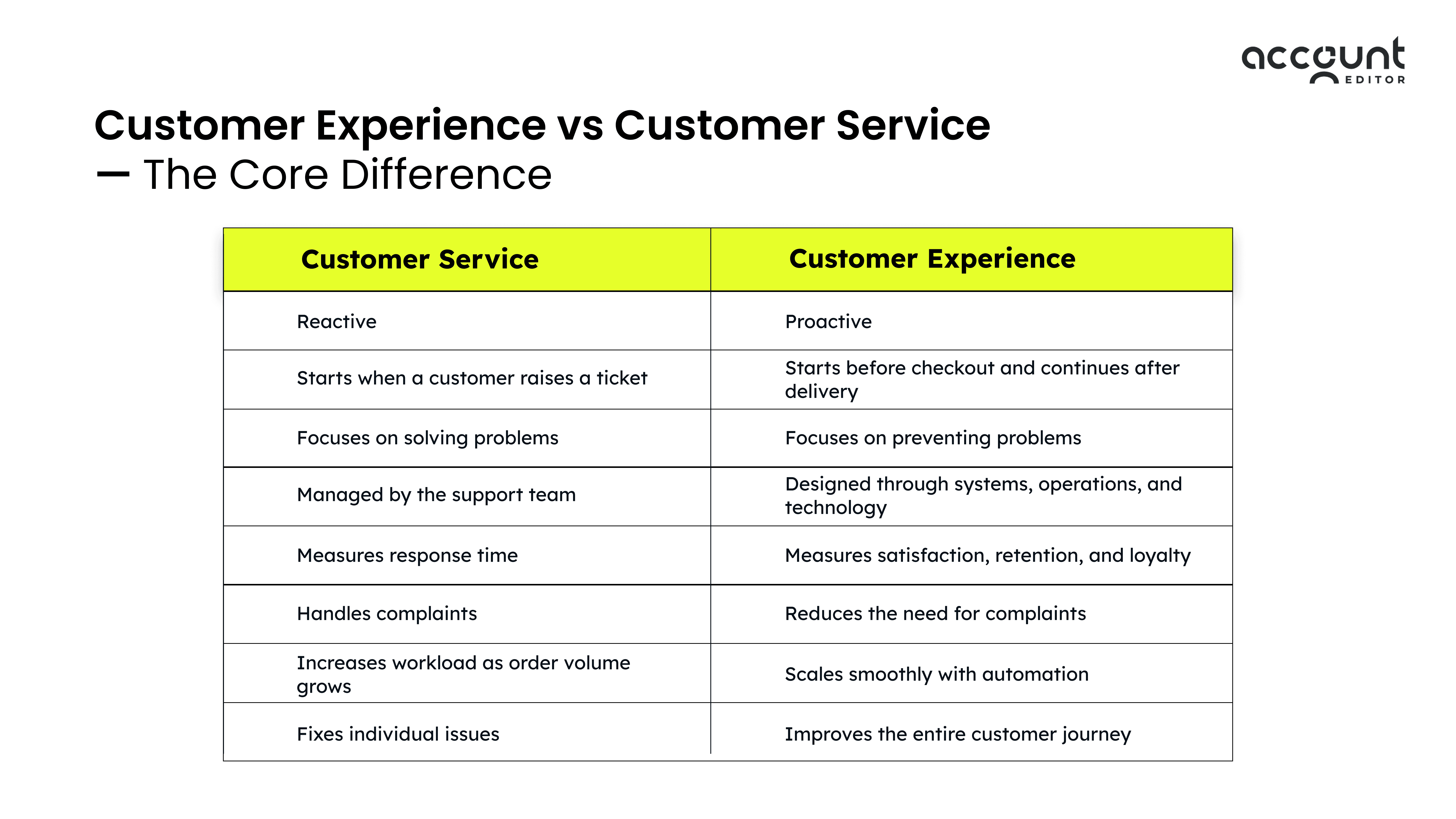
Customer Experience vs Customer Service — The Core Difference
Many merchants use these two terms interchangeably. But they are not the same.
Customer service is about responding when something goes wrong.
Customer experience is about designing the journey so fewer things go wrong in the first place.
Here’s the core difference in a simple format:
Why Fixing Tickets Isn’t Enough Anymore
Fast replies and polite support agents are important. But in modern eCommerce, especially on Shopify, resolving tickets is no longer enough to build loyalty or protect revenue.
Customer expectations have changed. Buyers want speed, control, and flexibility. If every small mistake requires emailing support and waiting for a reply, friction increases even if your team responds quickly.
The real issue is not how well you fix tickets. The issue is how many tickets your system creates in the first place. When your operations depend heavily on reactive support, growth becomes expensive and inefficient.
Let’s break this down.
1. Reactive Support Increases Operational Costs
Every support ticket has a cost, even if you don’t see it immediately.
As order volume increases, so does ticket volume. Address changes, size swaps, cancellation requests, tracking questions these are common in Shopify stores.
To handle them, merchants often:
Hire more support staff
Invest in helpdesk tools
Extend support hours
Build manual internal workflows
This increases operational overhead.
When customers experience friction after checkout and decide not to return, you lose retention and future revenue becomes more expensive to replace. Reactive support may solve the issue at the moment. But it doesn’t eliminate the root cause of repeated tickets.
This is where proactive customer experience systems become operationally smarter.
2. Post-Purchase Errors Drive Cancellations
The post-purchase phase is one of the most overlooked stages in e-commerce.
After checkout, customers carefully review their confirmation email and order summary. That’s often when they notice:
Wrong shipping address
Incorrect size or variant
Missing item
Accidental duplicate purchase
Changed decision
If their only option is to contact support and wait, frustration increases. In many cases, customers choose the simplest option: cancel the order.
According to Baymard Institute, 18 percent of US online shoppers abandon purchases because the process feels too long or complicated. While this focuses on checkout, it highlights how sensitive customers are to friction in the buying journey.
Fixing tickets does not reduce these cancellations. Preventing friction does. And that is the shift from customer service to customer experience.
The Real CX Problem in Shopify Stores
Many Shopify merchants invest heavily in optimizing product pages and checkout. If the transaction goes through smoothly, it feels like the experience is complete.
But the real customer experience gap begins after the payment is captured.
This is when customers slow down and review their confirmation email more carefully. They double-check their shipping address, re-read product details, and sometimes realize they made a mistake.
The problem is not that customers make errors. That’s natural in e-commerce. The real issue is how the system responds when those errors are discovered.
1. Shopify’s Default Post-Purchase Behavior
Shopify allows merchants to manually edit orders from the admin panel before fulfillment. However, customers cannot modify their own orders by default. If they need to change a shipping address, swap a variant, adjust quantity, or cancel an order, they must contact support.
This creates a support-dependent model.
A simple mistake turns into a ticket.
A ticket requires manual review.
Manual review introduces delay.
As order volume increases, this dependency grows. What seems manageable at 50 orders per day becomes operational pressure at 500.
To explore the full strategy behind post-purchase editing from setup to retention outcomes, check out The Complete Post-Purchase Order Editing Playbook.
2. Where the Experience Breaks
The typical post-purchase journey in many Shopify stores looks like this:
Checkout is smooth.
Payment is captured.
The customer notices an issue.
They are told to contact support.
They wait.
Even with a responsive support team, friction has already entered the experience. From the customer’s perspective, the process feels restrictive. From the merchant’s perspective, it increases support workload, operational costs, and the risk of cancellations.
The real CX problem is not slow response time. It’s the absence of proactive post-purchase flexibility.
This is exactly why many Shopify merchants now implement self-serve post-purchase systems such as Account Editor that allow customers to make controlled changes to their orders without contacting support.
How Self-Service Order Editing Improves Customer Experience
Once you understand the gap in Shopify’s default post-purchase flow, the solution becomes clear. Customer experience improves when customers are given controlled flexibility after checkout without compromising operations.
Self-service order editing transforms the post-purchase phase from a reactive support process into a proactive experience layer. Instead of relying on tickets, the system allows customers to make predefined changes within a specific time window.
This shift directly impacts customer satisfaction, operational efficiency, and revenue.
1. Customers Fix Mistakes Without Contacting Support
Small post-purchase mistakes are common. Customers may enter the wrong address, choose the wrong size, or forget to add an item.
Without a self-serve system, each of these becomes a support request. That means manual intervention, internal review, and waiting time. With a structured self-service order editing app like Account Editor, customers can:
Update their shipping address within an allowed timeframe
Swap variants or adjust quantities
Add additional items before fulfillment
Make changes directly from the order status page
The key is control. Merchants define the editing window, permissions, and restrictions. Customers get flexibility without creating operational risk. From the customer’s perspective, the experience feels fast and empowering. From the merchant’s perspective, ticket dependency decreases significantly.
For a deeper understanding of how self-serve order changes directly cut repetitive inquiries and unnecessary cancellations, see our guide on How Self-Service Order Changes Reduce Support Tickets and Order Cancellations on Shopify.
2. Reduced Cancellations
Many cancellations happen not because customers no longer want the product, but because they made a mistake and see cancellation as the easiest solution. If correcting an order feels complicated, waiting for support feels risky, or fulfillment seems imminent, customers may cancel instead of requesting a modification.
When customers can modify their orders themselves, cancellation becomes less attractive.
For example:
Instead of canceling due to the wrong size, they swap the variant.
Instead of canceling due to a wrong address, they update it instantly.
Instead of canceling to reorder with an extra item, they simply add it.
3. Increased Post-Purchase Upsell Revenue
The post-purchase window is not just a risk stage; it’s also an opportunity.
When customers revisit their order status page, they are still in buying mode. This creates a natural moment for relevant add-ons or complementary products. With a post-purchase order editing app such as Account Editor, merchants can:
Allow customers to add new products before fulfillment
Present conditional upsell offers
Increase order value without disrupting checkout
Unlike some pre-purchase upsell strategies that may impact conversion rates if poorly implemented, post-purchase offers occur after payment is secured, reducing risk to the initial transaction.
This turns post-purchase experience into a revenue driver instead of a support burden.
Self-service order editing does more than reduce tickets. It builds trust, lowers friction, protects revenue, and strengthens long-term retention.
It is not just a support tool.It is a customer experience strategy.
From Reactive Support to Proactive Experience
For years, e-commerce growth has been supported by strong customer service teams. Faster replies, better helpdesk tools, and expanded support hours were seen as the solution to customer satisfaction.
But today, that model is no longer enough.
As Shopify stores scale, ticket volume naturally increases. More orders mean more address corrections, variant swaps, and cancellation requests. If every issue requires manual intervention, support becomes a bottleneck rather than a growth driver.
Reactive support focuses on resolving problems after they occur. Proactive experience focuses on designing systems that reduce the likelihood of those problems occurring at all.
This shift is not about replacing support teams. It is about reducing unnecessary dependency on them.
1. What Reactive Support Looks Like
In a reactive model:
Customers discover an issue after checkout.
They contact support.
The team manually edits the order or processes a cancellation.
The experience depends on response time and availability.
Even if the issue is resolved quickly, the friction has already occurred. Over time, this model increases operational cost and slows scalability.
2. What Proactive Experience Looks Like
In a proactive model:
Customers are given controlled flexibility after checkout.
Minor corrections can be handled instantly.
Clear rules define what can and cannot be modified.
Support teams focus on complex cases instead of routine edits.
This approach reduces repetitive tickets while maintaining operational control. For Shopify merchants, proactive experience often means implementing structured post-purchase systems such as controlled order editing windows, automated notifications, and self-service modification options.
Instead of hiring more agents as orders grow, the store becomes operationally smarter. The real advantage of proactive experience is scalability. Revenue can increase without support costs rising at the same rate.
That is the difference between managing growth and enabling growth.
How Account Editor Solves This Gap
The customer experience gap in Shopify stores appears after checkout when customers discover small mistakes but have no way to correct them without contacting support.
By default, Shopify allows merchants to manually edit orders in the admin before fulfillment. But customers cannot modify their own orders unless a structured solution is implemented.
This is where Account Editor bridges the gap.
Instead of turning every post-purchase change into a support ticket, Account Editor introduces controlled self-service within clearly defined rules.
Here’s what that looks like in practice:
1. Editing Window Control
Merchants set a specific timeframe during which customers can modify their orders. Once the window closes or fulfillment begins, editing is automatically disabled.
2. Address Updates
Customers can update their shipping address directly from the order status page, reducing urgent support tickets and shipping errors.
3. Variant & Quantity Changes
Customers can swap product variants or adjust quantities within allowed limits, preventing unnecessary cancellations.
4. Add Items Post-Purchase
Customers can add additional products before fulfillment, increasing order value without disrupting checkout.
5. Controlled Cancellations
Merchants can allow cancellations within defined rules, turning chaotic refund requests into a structured process.
Conclusion
Customer service will always matter. Fast responses, helpful agents, and clear communication are essential for any Shopify store.
But in today’s eCommerce landscape, fixing tickets is no longer enough.
Customers expect speed, flexibility, and control, especially after checkout. If every small mistake requires contacting support, friction increases. And friction eventually leads to higher operational costs, avoidable cancellations, and lost long-term loyalty.
The real difference between customer experience vs customer service is not about effort. It is about design. Customer service reacts to problems. Customer experience builds systems that reduce those problems in the first place. For Shopify merchants, the post-purchase stage is one of the most overlooked opportunities to improve experience. Allowing customers to correct small mistakes, modify orders within defined rules, and manage changes without waiting transforms the entire journey.
That’s where a structured solution like Account Editor fits naturally, helping merchants reduce support dependency, lower cancellations, and create a smoother post-purchase experience without disrupting fulfillment workflows. If your store is growing and ticket volume is growing with it, it may not be a support issue. It may be an issue in experience design.
If you’d like to improve your post-purchase customer experience with controlled self-serve order editing, explore how Account Editor can support your Shopify store’s growth.