Post-Purchase Order Changes on Shopify Legacy Accounts: A Complete Workflow Guide

Managing post-purchase order changes on Shopify legacy accounts is a common operational challenge for merchants. After checkout, customers often request updates such as changing a shipping address, swapping a product variant, adding an item, or canceling an order.
However, Shopify does not allow customers to make these changes themselves, even on legacy (classic) customer accounts. Any post-purchase edits must be handled manually by store admins or support staff.This guide explains how post-purchase order changes on Shopify legacy accounts actually work in practice. It breaks down what Shopify supports natively, where restrictions apply, and how Shopify store owners can build reliable workflows for handling address changes, item edits, refunds, and cancellations. The goal is to help support and operations teams reduce manual work, avoid errors, and deliver a smoother post-checkout experience without relying on assumptions or unsupported workarounds.
Why Post-Purchase Order Changes Matter for Shopify Merchants
For most Shopify merchants, post-purchase order changes aren’t unusual. They happen regularly and are a normal part of running an online store. Customers often reach out after checkout to make small updates, but when these requests aren’t handled smoothly, they can slow down operations, increase support workload, and impact customer satisfaction.
1. The most common post-purchase change requests
Across mid-market and Plus merchants, support teams typically see the same patterns:
Wrong shipping address
Customers notice errors minutes or hours after checkout, especially with mobile purchases and auto-filled addresses.Variant or size swaps
Common in apparel, footwear, and other configurable products, especially when orders include customized items where customers need to update size, variant, or other selected details after checkout.Forgotten add-ons or accessories
Customers want to add an item instead of placing a second order.Accidental purchases and fast cancellations
Duplicate orders, wrong products, or buyer’s remorse before fulfillment.Shipping method changes
Requests to upgrade to express shipping after checkout.
Each of these scenarios typically requires a post-purchase support action in Shopify, which may involve an order edit, cancellation and reorder, or manual resolution depending on fulfillment status.
2. Why do these requests become expensive at scale
Individually, these changes look simple. Operationally, they add up fast:
Even 1–3 percent of total orders requesting changes can create a constant support backlog at scale.
A single order change can easily take 5–10 minutes of staff time, depending on factors like payment status, fulfillment progress, and whether the order includes custom or configurable items. This time is typically spent switching between the Shopify admin, verifying order details, coordinating internally, and communicating back and forth with the customer.
When handled by support agents or eCommerce managers, these small edits translate into real labor costs, especially at scale, turning routine post-purchase changes into a recurring operational expense rather than a one-off task.
Without a defined workflow, Shopify order changes handled through supportconsume time that could otherwise be spent on revenue-driving or retention-focused tasks.
3. Customer experience impact
From the customer’s perspective, post-checkout flexibility is expected:
Customers assume orders can be edited before shipment
Delays or rigid “no changes allowed” responses lead to:
Order cancellations instead of edits
Duplicate orders and refund requests
Negative reviews and chargeback disputes
Lesser repeat purchases and negative brand impact
When merchants cannot confidently manage post-purchase order changes, the issue is not just operational. It directly affects trust and perceived service quality.
4. Why is this especially important for legacy accounts
With legacy/old customer accounts, merchants rely more heavily on support-led workflows rather than customer self-service. This means:
Support teams act as the gatekeepers for all order changes
Mistakes or unclear rules lead to inconsistent decisions
Fulfillment teams may not see updates in time without proper tagging or notifications
Inside Shopify, these constraints make it critical to standardize how and when order edits are allowed.To support this reality, Account Editor now works with Shopify legacy (classic) customer accounts, allowing post-purchase edits without changing the existing login experience.
The operational takeaway
Post-purchase order changes aren’t a “nice-to-have” workflow, they’re a recurring operational reality. Merchants who define clear rules for when and how orders can be edited after checkout (such as edit cut-off times, payment conditions, and fulfillment checks) see measurable operational improvements, including:
Faster resolution of order-change requests
Fewer manual errors during fulfillment
Reduced back-and-forth between support and operations teams
Lower revenue loss from avoidable refunds or cancellations
This is why understanding and optimizing post-purchase order change workflows is foundational for sustainable Shopify operations, especially when working within the limits of legacy customer accounts.
Shopify Legacy Customer Accounts: What They Are and Why They Still Matter
When you hear “Shopify legacy accounts,” it refers to what Shopify previously called classic customer accounts, the traditional login system where customers sign in with an email and password to see past orders, saved addresses, and profile info. This version has existed since Shopify’s early days and is still fully supported, but it’s increasingly treated as legacy as Shopify shifts focus toward modernized customer accounts. As per Shopify new customer accounts are the future and although they have not yet announced a timeline, legacy customer accounts will eventually be retired.
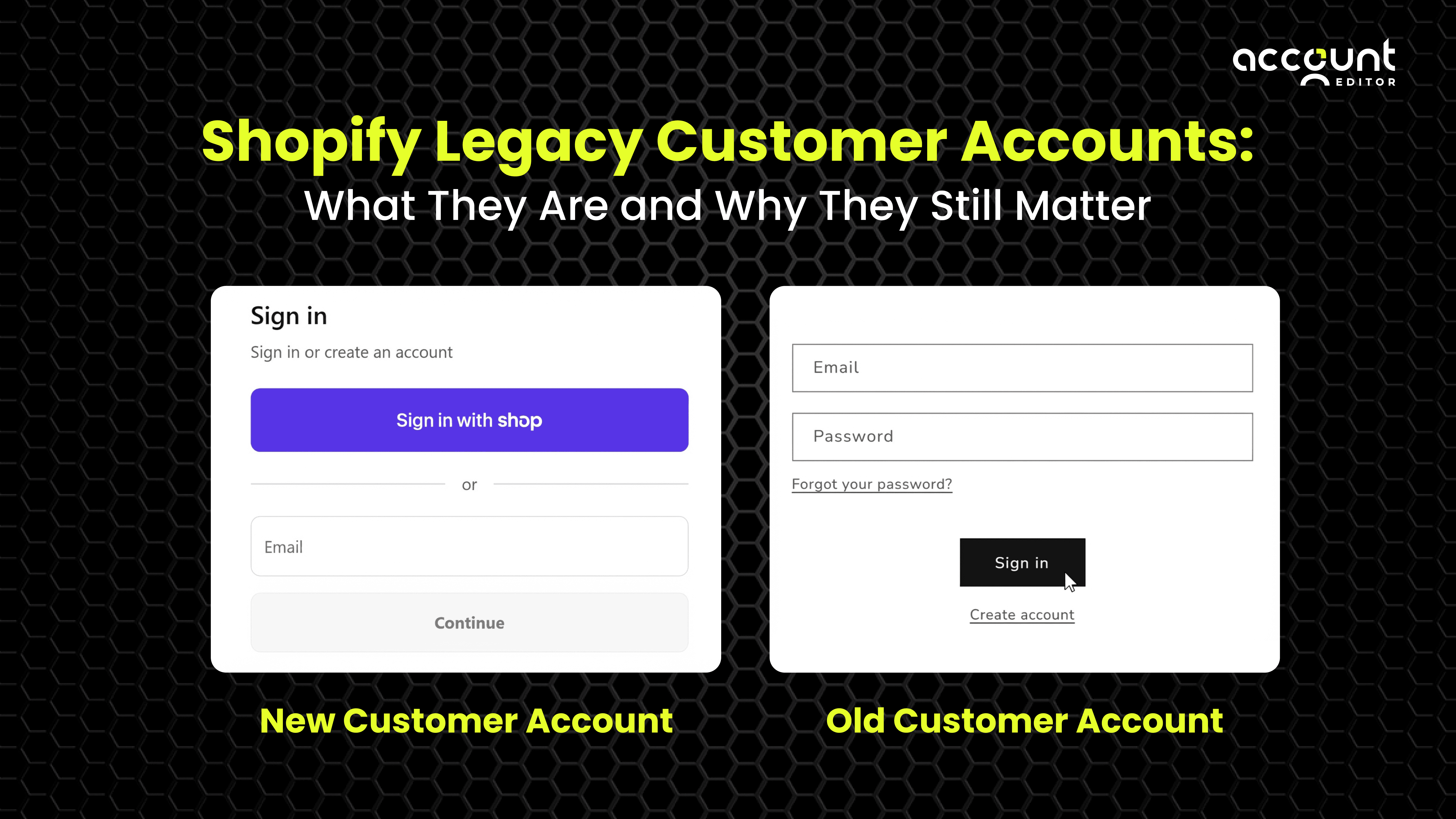
1. What makes legacy customer accounts different?
Legacy customer accounts are defined by a few core behaviors and limitations when compared with Shopify’s newer customer accounts:
Login method:
With legacy customer accounts, customers create an account using an email address and password and can reset their password if they forget it. In contrast, Shopify’s newer customer accounts use a passwordless login flow, where customers receive a one-time 6-digit code by email to access their account, removing the need for password creation or resets.
Customization model:
Legacy accounts are rendered through the store’s theme and support Liquid-based customization. This allows merchants to tailor the layout and presentation of account pages using theme code. New customer accounts do not support the same Liquid-based editing model and instead rely on app extensions and predefined blocks for customization.
B2B and advanced features:
Shopify’s native B2B features, including company profiles and wholesale catalogs, are designed to work with the new customer account system. Merchants using legacy accounts may still support B2B workflows through apps or custom setups, but Shopify’s built-in B2B tooling is optimized for the newer account architecture.
From a platform perspective, Shopify positions the newer customer accounts as the successor to legacy accounts, while continuing to support both options within the admin based on a store’s configuration.
2. Why legacy accounts still matter
Despite Shopify’s shift toward passwordless, extensible customer accounts, legacy accounts remain relevant for many merchants today for practical and operational reasons:
Existing workflows and integrations:
Many stores have built long-standing support processes, theme customizations, and CRM or helpdesk integrations around legacy customer accounts. Moving away from them often requires reworking these established workflows.
Customization control:
Because legacy accounts rely on Liquid and theme files, merchants with specific branding requirements or custom UX patterns often prefer the level of control legacy accounts provide over the account experience.
No forced sunset:
Shopify continues to support legacy customer accounts and has not published an official timeline for their removal. While newer customer accounts are recommended for future-facing features, many merchants continue to rely on legacy accounts as of 2026.
3. Key limitations of legacy accounts you should know
Legacy customer accounts come with several limitations that merchants should plan for, especially when compared with Shopify’s newer customer account system:
No native saved payment methods:
Customers cannot store payment details within a legacy account, which can introduce additional friction for repeat purchases or post-purchase payment adjustments.
Support-led returns:
Legacy accounts do not include built-in self-serve returns functionality. Customers typically need to contact support to initiate returns unless a third-party app is used.
Evolving app ecosystem:Some newer Shopify integrations and account-related extensions are built mainly for the modern customer accounts system, which can limit functionality for stores that continue using legacy accounts. For example, certain account extensions and post-purchase self-service features are designed to work only with Shopify’s newer customer account framework and aren’t available to merchants on legacy accounts.
4. How legacy accounts behave from an operational perspective
Under legacy accounts, customers authenticate using an email address and password, and their account pages are served directly through the store’s theme. Merchants are responsible for ensuring that elements such as saved addresses, password resets, and order history function correctly alongside the checkout experience.
What Shopify (Natively) Lets You Edit After Purchase
Shopify does not provide native, customer-facing order editing after checkout on legacy customer accounts. Any post-purchase changes; such as address updates, add item, remove item etc. must be handled manually by store admins or support staff from the Shopify admin.
All native edits happen at the order level in the Shopify admin and are governed by fulfillment status, payment capture, and tax recalculation logic. Shopify documents these behaviors in its Help Center, and they have remained consistent over the last year with incremental UI improvements rather than policy changes.
Below is a clear breakdown of what Shopify allows and where limitations apply.
Line item changes
On Shopify, line item edits can only be made by staff and only while an order is unfulfilled. These edits may also be affected by payment capture status and fulfillment settings.
What staff can do natively:
Increase or decrease item quantities
Remove an item from an order
Add a new product or variant to the order
Actual limitations to be aware of:
Once an item is fulfilled, it can’t be edited or removed
Changes often require manual checks to ensure inventory, pricing, and payment totals stay accurate, especially for paid orders
Shipping adjustments
After an order is placed, shipping-related changes on Shopify are handled by staff and are limited to specific situations.
What staff can do:
Update the shipping address before fulfillment
Replace or adjust the shipping rate in supported scenarios during manual order handling
Important considerations (not system flaws):
Once an order is fulfilled, address changes won’t update already created shipping labels
Address changes may not automatically sync with some third-party fulfillment services and often require manual confirmation
Because customers can’t update shipping details themselves, address-change requests, especially within the first few hours after checkout are one of the most common post-purchase support issues for Shopify merchants.
When You Need More Than Shopify - Tools, Apps & Extensions
Shopify’s native order editing tools are designed for clarity and control. They make it possible to fix simple issues after checkout, such as correcting an address or adjusting an item, without adding unnecessary complexity. For many merchants, especially at lower volumes, this approach is practical and easy to manage.
As order volume grows, those same simple requests tend to arrive more often and from more places at once. That’s when some merchants explore additional tools, not to change how Shopify works, but to make everyday order edits easier to handle, track, and respond to consistently. The goal isn’t speed for its own sake. It’s creating a smoother experience for both customers and support teams while staying within Shopify’s built-in rules. This is particularly relevant for stores using legacy customer accounts, where our app Account Editor now extends post-purchase editing into existing workflows.
1. Native Shopify vs enhanced tools
Native Shopify order edits work best when:
Order changes are infrequent
Support teams handle edits manually
Changes happen quickly before fulfillment
No customer-facing self-service is required
Apps and extensions become necessary when:
Order edits happen daily or at scale
Customers expect faster resolution without support tickets
Merchants want structured rules instead of manual checks
Post-purchase upsells are part of the revenue strategy
This is where searches like “post purchase order editor Shopify” and “self service order editing Shopify” typically come from.
2. Solving Post-Purchase Order Edits on Legacy Customer Accounts
Account Editor fills the gap that exists on Shopify legacy customer accounts by enabling customer-initiated post-purchase order edits that would otherwise require manual support intervention. It allows eligible changes to be completed directly from the storefront, while still respecting Shopify’s rules around fulfillment status, inventory availability, and payments. Merchants can control when and how edits are allowed using clear time windows and eligibility rules, ensuring changes remain safe and predictable. Where supported by the store’s setup, Account Editor can also handle post-purchase item additions and collect additional payment, helping merchants manage order changes efficiently without creating new orders or increasing support workload.
Final Notes for Merchants
Post-purchase order changes are a normal part of operating a Shopify store, especially on legacy customer accounts where customers can’t edit orders themselves. Shopify requires these changes to be handled by staff and within strict fulfillment and payment rules, which makes ad-hoc handling inefficient over time. Treating order edits as a defined workflow—rather than one-off requests—helps reduce support load, errors, and customer frustration. The right structure or tooling can make these recurring changes easier to manage as order volume grows.
Key things to keep in mind:
Post-purchase changes happen regularly, not occasionally
Fulfillment status determines what can be edited
Manual handling doesn’t scale well with growing order volume
Clear rules and time windows reduce support friction
Post-checkout experience strongly affects repeat purchases
Choosing the right level of tooling
Not every store needs advanced tooling. For some, Shopify’s native features are enough. For others, especially those managing higher-order volumes or support teams, additional tools can reduce manual work and errors.
If you’re reviewing how post-purchase changes are handled today, it can be useful to see how other merchants approach the same challenges. Account Editor is designed to work within Shopify’s existing rules while helping teams manage common order edits more consistently after checkout. Exploring how it fits into your workflows can help you decide whether it supports your operational goals.