Order Editing vs. Order Cancellation: The Smarter Way to Handle Post-Purchase Changes
What if the biggest threat to your Shopify store’s revenue isn’t abandoned carts, but the post-purchase mistakes customers make after they place an order?
It happens every single day: someone selects the wrong size, enters an incomplete address, forgets to apply a discount, or decides they actually needed two items instead of one. These small errors create major friction for both Shopify merchants and customers, and how you respond can dramatically impact customer satisfaction, operational efficiency, and long-term revenue. Most Shopify stores fall back on the simplest fix: cancel the order, issue a refund, and tell the customer to reorder.
But this old-school approach causes new problems. Customers must repeat checkout, support teams get overwhelmed, fulfillment queues get disrupted, and worst of all, many shoppers never place the order again.
Order cancellation may solve the mistake, but it silently kills conversions.
On the other hand, post-purchase order editing and post-purchase changes provide a smoother, more flexible, and revenue-friendly alternative. It reduces cancellations, improves retention, and keeps your operations running efficiently by allowing customers (or support teams) to update order details without restarting the entire process.
In this article, we’ll break down the real difference between order editing vs. order cancellation, explore how post-purchase flexibility directly impacts revenue, customer experience, and fulfillment workflows, and reveal real Shopify post-purchase metrics that show why order editing is becoming the smarter, more scalable strategy for modern eCommerce brands.
Order Editing vs Order Cancellation: What’s the Real Difference?
To understand why order editing matters, we need to compare it directly with cancellation. On the surface, both deal with change requests. But under the hood, they have drastically different implications.
Order cancellation removes an order entirely, the payment is reversed, the order record is closed, and the customer must place a brand-new order. This breaks the workflow, slows down fulfillment, increases workload for support teams, and often results in lost revenue because many customers never reorder.
Definition - “ Order cancellation is the process in eCommerce where a confirmed customer order is officially voided before it is fulfilled. When an order is cancelled, the payment is reversed or refunded, the order record is closed, and no items are shipped. After cancellation, the customer must place a completely new order if they still wish to make the purchase. “
By contrast, order editing modifies the original order. Whether the customer changes their shipping address, swaps a variant, or adds an item, the transaction remains intact. This preservation of value, combined with reduced friction, is where the benefits compound.
Definition - “ Order editing means allowing customers to modify their order after checkout, such as updating the address, changing variants, or adjusting quantities, while keeping the original transaction active. This prevents unnecessary cancellations, preserves revenue, reduces support workload, and ensures a smoother, more flexible post-purchase experience. ”
What Happens When Customers Cancel Orders
Hidden Revenue Loss
Cancellation often seems harmless - “Just cancel and let the customer reorder.” But the data tells a very different story. Publicly shared metrics from Shopify post-purchase tools show that merchants have processed over 500,000 order edits instead of cancelling those orders. If even a small portion of those edits had resulted in cancellations, the combined revenue loss across Shopify stores would have been substantial, especially when considering repeat-purchase behaviour, abandoned reorders, and reduced customer retention.
To illustrate, imagine a merchant who processes 100 orders a day with an average order value (AOV) of $40. If 6% of orders need post-purchase changes and they’re all cancelled instead of corrected, that’s 6 orders lost per day, equating to $240 daily, or $7,200 monthly in lost revenue. Over a year, that’s over $86,000 in sales surrendered just because the system couldn’t handle small corrections.
That’s a conservative estimate. For many growing stores, the cancellation-related revenue leakage can be much higher, especially when cumulative over months or years.
Lost Customer Lifetime Value (LTV)
Every cancellation threatens not just a one-time order but the customer’s full lifetime value, because when the post-purchase experience is frustrating, many customers never return. According to Shopify, when a customer makes, for example, three repeat purchases of $40, their CLV would be about $120. Shopify
Repeat customers also spend significantly more: returning buyers typically spend 67% more over time compared to first-time buyers. vennapps.com
For Shopify stores, increasing purchase frequency is one of the most effective ways to raise CLV. A 10% increase in order frequency can raise CLV by up to 30%, according to e-commerce benchmarks. Opensend
Higher Support Costs & Ticket Volume
Cancelling orders typically generates more support tickets: teams must process refunds, guide customers through reorders, and manually correct order details. These tasks are labour-intensive and reduce operational efficiency.
According to Onramp Funds, higher customer churn (which cancellations contribute to) reduces LTV and forces businesses to spend significantly more on support and customer acquisition. Onramp Funds
Economically, retaining existing customers is far cheaper than acquiring new ones. Keeping a customer can cost 5–25× less than acquiring a new one, especially when factoring in support costs. Onramp Funds
What Happens When Customers Can Edit Orders
Immediate Order Updates Without Refunds
When customers can correct mistakes themselves, they do so quickly. Instead of cancelling and reordering, they can update their shipping address, change the product variant, modify quantities, or even remove or add items, all within the original order. This kind of order update preserves the financial transaction and reduces cancellation risk while maintaining the customer’s trust. In practice, this means the majority of post-purchase issues never escalate to refunds. For merchants using a tool like Account Editor, every edit is a retained opportunity, not a lost sale.
Empowering Customers, Reducing Friction
The psychological impact of giving customers control cannot be understated. When shoppers realize they can fix a mistake without jumping through hoops, the experience becomes more forgiving, more trustworthy, and ultimately more human. This customer empowerment leads to less anxiety: more customers feel confident completing their purchase, even if they suspect they made an error. Confidence in the post-purchase process is a subtle but powerful driver of loyalty and repeat business.
Better Operational Efficiency
With order editing, support teams dramatically reduce their volume of manual change tickets. Instead of refunding and reprocessing, agents can triage only complex cases that require human assistance beyond an address tweak or quantity adjustment. This frees up time for high-value work: handling escalations, improving self-serve resources, or helping VIP customers. On the fulfillment side, because fewer orders are cancelled, pick-and-pack workflows run more smoothly. Inventory remains more stable, and reversals are less frequent.
Proactive Error Reduction Before Shipment
Editing prevents errors before they become costly problems. For instance, when customers correct their shipping address, you avoid failed deliveries. When they swap a variant, you prevent sending the wrong item. By catching mistakes early, not after refunding or reshipping, you reduce the rate of mis shipments and returns. This upstream error correction translates to lower return costs, fewer customer complaints, and sustained operational efficiency.
Why Post-Purchase Changes Matter More Than Ever
The Modern Buyer Expects Flexibility
Today’s eCommerce customer isn’t satisfied with a rigid system. After hitting “Place order,” they expect the flexibility to edit. They might realize they left out discount codes, typed a wrong number, or want to upgrade shipping. In a world where Amazon and other giants offer post-purchase adjustments, flexibility has become a baseline behavioural expectation. If your store can’t accommodate that, customers may feel trapped, and that perception hurts retention.
Common Scenarios Are More Impactful Than You Think
Many post-purchase change requests center on small, easily resolved issues:
Address corrections: perhaps they moved recently, or mis-typed a digit.
Variant or size swaps: common in apparel, accessories, or colour-based products.
Quantity adjustments: they meant to order more or less.
Adding/removing items: they forgot something or changed their mind.
Delivery instructions: “leave at the back door,” “ring twice,” or “gate code 1234.”
Allowing edits for these common issues isn’t just a nicety; it’s a way to reduce cancellations, correct errors, and retain sales.
Financial and Retention Implications
Rigid post-purchase systems rarely pay off. When customers hit a wall after checkout, many abandon the reorder or defect to a competitor on their next purchase. This impacts customer retention, average order value (AOV), and repeat purchase rate in a way that acquisition-focused strategies might not fully counterbalance.
Enabling post-purchase edits builds trust: customers feel they’re dealing with a brand that respects their time, their mistakes, and their expectations. That trust converts into repeat purchases, stronger lifetime value, and lower support burden.
Why Order Editing Is the Smarter, More Profitable Choice for Shopify Stores
Order editing isn't just a feature; it's a strategic lever. Here’s why it’s often the smarter, more profitable choice:
Saving Revenue and Preventing Cancellation-Driven Leakage
Every corrected order is a preserved sale. When customers self-serve edits instead of cancelling, stores avoid refund churn, reduce loss, and maintain cash flow. Tools like Account Editor report 500,000+ successful order edits, meaning half a million potential cancellations were averted. Those are real transactions saved.
Moreover, data from AccountEditor shows 137,000+ address corrections alone, demonstrating how many orders avoid failed delivery through self-service correction.
Improving Customer Satisfaction and Retention
The flexibility to correct errors strengthens trust. A store that allows customers to modulate their orders builds a reputation for being responsive and caring, not rigid. In fact, merchants using Account Editor have reported an 80% reduction in address change tickets. That’s not just less support, it’s happier customers who can solve their own problems quickly.
Real Scenarios Where Editing Avoids Cancellations
Scenario 1: Address Correction
Imagine a customer, let's call her Maria, placing an order for a new home decor piece. She’s just moved into a new apartment and typed in her old address by mistake. Without editing capabilities, your only option might be to cancel the order, refund her, and ask her to place it again. That means she has to go through checkout, wait for her refund, and maybe even forget to re-order. With a self-serve editing system, Maria sees an “Edit order” option on the order status page. She corrects her apartment number, updates her city, and confirms. You log the correct shipping details, fulfillment proceeds as normal, and the item ships. The order isn’t lost, and neither is her trust.
Scenario 2: Variant or Size Change
Jessica orders a shirt in medium but later realizes she should have selected a large. A system built only on cancellations forces her to reach out or cancel and re-buy. That costs her time and possibly confidence. Instead, with editing, she changes her size herself via the order-status page. The original order is preserved, the fulfillment system updates, and nobody loses.
Scenario 3: Quantity or Product Adjustment
Say a customer named Alex orders one candle but realizes later that he actually needed two. Alternatively, maybe he regrets adding a second candle and wants to remove one. In a cancellation-only model, he’d likely cancel and reorder, with all the friction that entails. With order editing, he can simply adjust the quantity or remove the unwanted item. This helps the store retain the sale, avoid refund costs, and maintain inventory balance. Over time, this behaviour contributes to smoother order management and higher average order value.
Scenario 4: Delivery Instructions Update
Consider Emily, who just ordered a gift that’s going to her parents’ house. She forgets to include the gate code or special delivery note. Without edit functionality, she might cancel the order or risk it being left somewhere unsafe. But with self-service editing, a “notes” or “instructions” field can be updated post-purchase, letting her type in “Gate code 4321, leave at back door.” According to our research, over 17,000 customer notes have been edited or refined, showing that this capability is widely used. The result? No cancellation, fewer shipping issues, and a happier customer.
How Account Editor Helps Shopify Merchants Handle Post-Purchase Changes
Here’s a deeper look at how Account Editor, a purpose-built Shopify app, enables order editing to reduce cancellations, fix mistakes, and capture value.
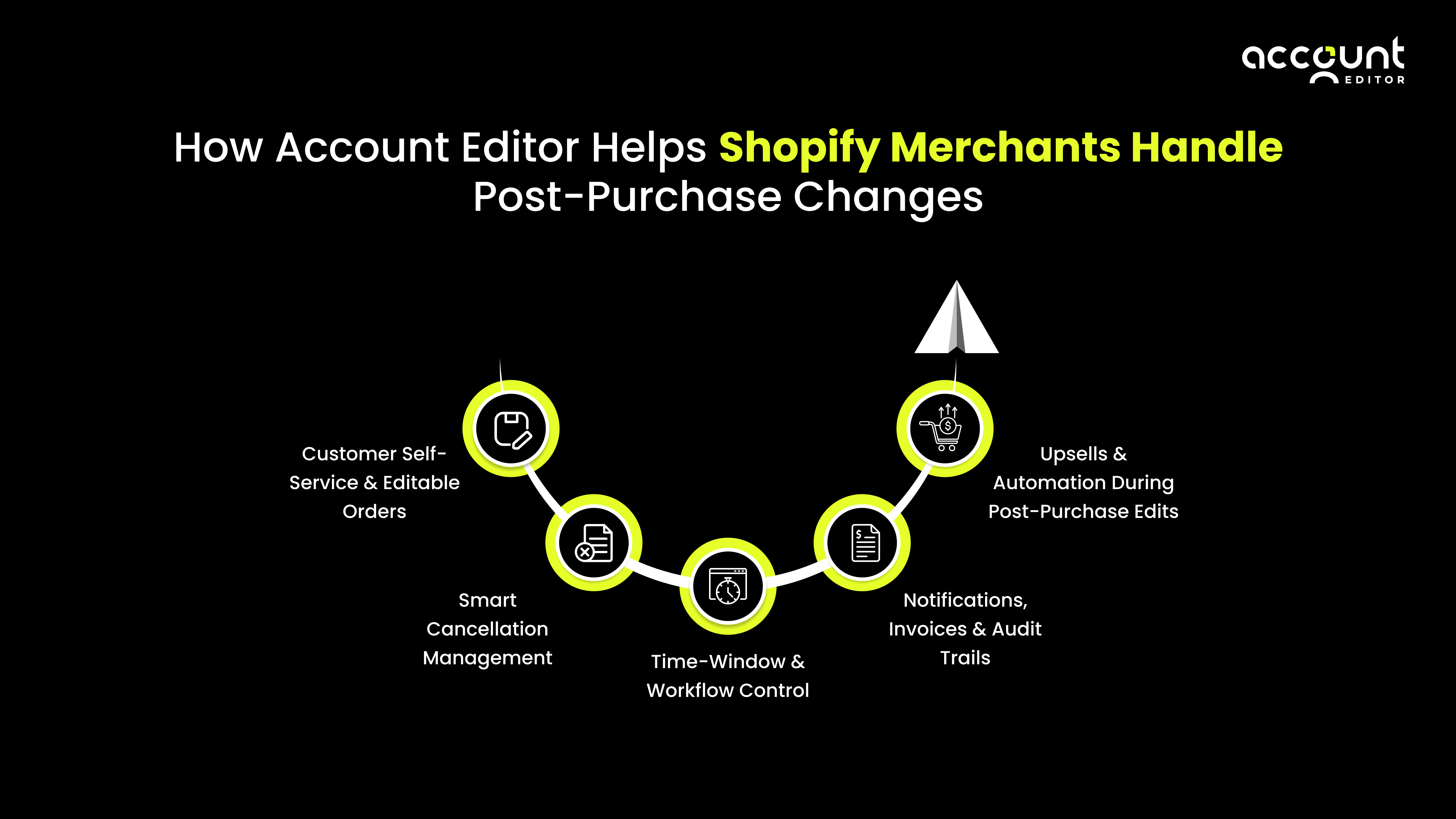
Customer Self-Service & Order editing
Account Editor gives merchants full control over what customers can modify after checkout, allowing shoppers to update shipping addresses, correct contact details like phone numbers or emails, and even adjust line items, including variant changes, quantity updates, or product removals, all without opening a support ticket. This level of flexibility empowers customers to fix common post-purchase mistakes quickly and confidently, reducing cancellations and supporting workload while keeping the original order intact.
In short, shoppers can correct address typos, swap sizes or colours, adjust quantities, refine contact details, and more, creating a seamless and friction-free post-purchase experience.
Smart Cancellation Management
Unlike black-and-white cancellation policies, our app gives merchants granular control. You can enable or disable cancellation, decide which orders are cancellable, and even charge restocking fees. This is not a one-size-fits-all system; merchants tailor cancellation rules to their unique margins, fulfilment processes, and risk tolerance.
Time-Window & Workflow Control
A core feature is defining how long edits are allowed. Account Editor lets you choose a preset editing window (minutes, hours, or days) or set a custom duration that aligns with your fulfilment cycle
By controlling when editing closes, you minimize fulfillment disruption while still giving customers room to correct mistakes. You maintain operational consistency without sacrificing flexibility.
Notifications, Invoices & Audit Trails
Every time a customer edits, both the merchant and the buyer receive email notifications. Account Editor automatically generates updated invoices, which customers can download directly.
Additionally, every change is recorded in a log of who made the edit, when, and what was changed. This audit trail helps with transparency, dispute resolution, and internal clarity.
Upsells & Automation During Post-Purchase Edits
Rather than just correcting mistakes, Account Editor lets you drive additional revenue. Merchants can set up upsell rules that present complementary products during the edit flow or on the confirmation page.
These upsell offers can be customized based on customer segmentation, cart value, or collections. Through Shopify Flow integration, these edits and upsells can trigger automated workflows, turning potential cancellations into incremental sales.
Comparison: Editing vs Cancelling
When comparing the two approaches side-by-side, the operational, financial, and customer-experience differences become stark.
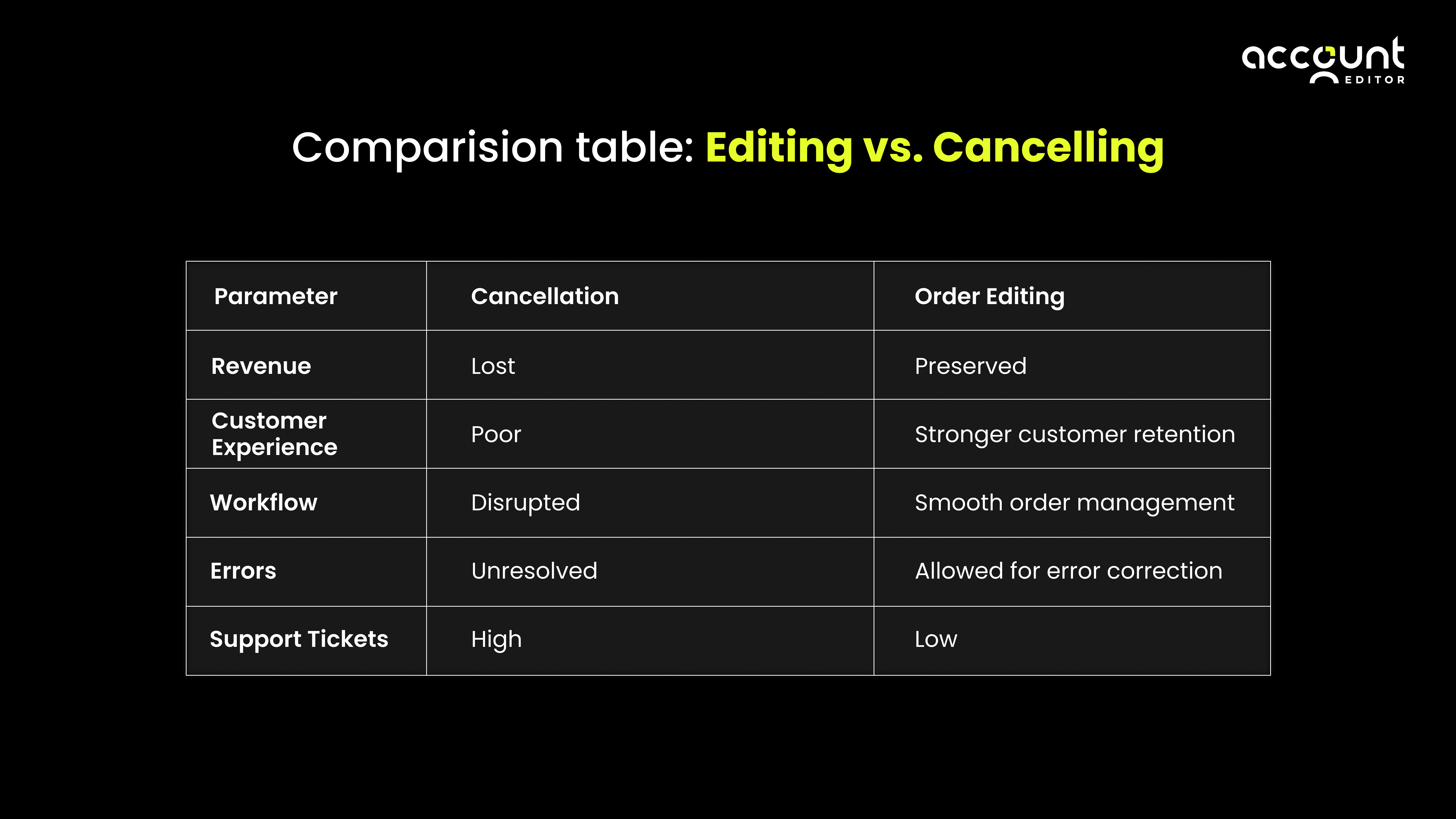
Revenue: Cancellations discard the order, editing preserves it and may even add value via upsells.
Support burden: Cancellation means manual refunding and ticket handling, editing routes, and customers to self-serve.
Fulfillment: Cancelled orders require rework; edited orders flow through normal fulfillment processes.
Error correction: Editing allows resolution of typos, wrong variants, and quantity mistakes; cancellation ignores nuance.
Customer experience: Cancelling can frustrate or lose customers, editing builds trust and satisfaction.
When Cancellations Still Make Sense
Order editing is powerful, but it’s not a universal fix. There are scenarios where cancellation remains the correct action:
Fraud or risk concerns: If an order is flagged for fraud, cancelling may be the safest route.
Fulfillment already in motion: Once an order has shipped or is locked in the warehouse, editing may be impractical or risky.
Payment or chargeback issues: If payment fails or you suspect chargebacks, cancellation may be more secure than editing.
Customer insists on a refund: Sometimes customers distrust edits or simply want their money back; accommodating that can preserve goodwill.
With a flexible editing system like Account Editor, you can build rules to allow cancellations selectively, not as a default for every change request.
Practical Considerations and Potential Drawbacks
Before enabling customer order editing, it’s important to understand a few practical factors that affect how Shopify processes edits, reports data, and manages fulfillment.
The goal of this section is to equip merchants with the right expectations so they can enable order editing confidently, avoid operational surprises, and maintain a smooth workflow.
Order editing is one of the most effective ways to reduce cancellations and improve customer experience, and understanding these considerations simply helps you implement it correctly.
Shopify Limitations & Reporting Behavior
Shopify handles edited orders differently in analytics. According to Shopify’s Help Center, if an order is edited after the day it was placed, the adjustment may appear as a new order entry in reporting. This doesn’t affect revenue collection but may require you to adjust how you interpret metrics like:
Daily sales totals
Average Order Value (AOV)
Sales trends across date ranges
Additionally, some third-party fulfillment or shipping apps may not automatically sync changes when a line item is removed or adjusted. This isn’t a flaw of order editing, it's simply a Shopify ecosystem behaviour.
A quick internal check or integration test ensures that your systems stay aligned.
Why this matters: Understanding these behaviours ahead of time allows merchants to enable order editing without misreading analytics or fulfillment data.
Choosing the Right Editing Window
Editing windows are powerful; they give customers flexibility while protecting your fulfillment workflow.
However, the right duration depends on your business operations:
A longer window (1–48 hours) provides customers more freedom and reduces support requests.
A shorter window (5–30 minutes) minimizes operational risk if your team ships immediately after purchase.
Neither option is “wrong.”
The key is aligning the window with:
Your picking-packing speed
Inventory turnover
Fulfillment cut-off times
Shipping carrier pickups
Why this matters: A well-chosen editing window leads to high customer satisfaction while keeping fulfillment efficient and interruption-free.
User Experience & Communication Matter
Order editing only works if customers actually see and use the option.
If the “Edit Order” button is hidden or unclear, customers will still email support, defeating the purpose.
A strong editing experience includes:
A clearly visible Edit Order button on the Order Status page
Clean and intuitive UI
Simple instructions like:
“You can edit your order within the next 2 hours.”
Apps like Account Editor add widgets to the Thank-You and Order-Status pages, but merchants should still test visibility and placement.
Why this matters:Clear UX drives higher self-service usage, fewer cancellations, and reduced support tickets.
Data Complexity & Audit Trail
With editable orders, the store’s backend must track:
What was changed
When the change was made
How inventory and billing were updated
An audit trail (included in order-editing apps) helps maintain clarity, but internal workflows need to align with these changes, especially when multiple staff members or systems are involved.
Why this matters: Clear audit logs avoid confusion and ensure your team always knows the current “true” version of the order.
Final Thoughts: Why Smarter Post-Purchase Experiences Win
The difference between order editing and order cancellation isn’t just semantic; it's strategic. Offering customers the ability to self-edit their orders turns post-purchase risk into a retention engine.
When a customer corrects an address, swaps a variant, or updates quantity on their own, they feel empowered. You avoid refunds, reduce support load, and prevent expensive fulfillment mistakes. Over time, these incremental corrections add up to real savings, higher trust, and more repeat purchases.
The scale of this impact is evident in AccountEditor’s data: 500,000+ order edits, 137,000+ address corrections, 41,000+ variant swaps, 73,700+ upsells, 52,900+ smart cancellations, 17,000+ custom notes, and 4,200+ shipping upgrades. accounteditor.com These aren’t just metrics; they represent orders that were saved, enriched, or smoothly managed, rather than lost in cancellation chaos.
If your goal as a merchant is to reduce cancellations, strengthen customer retention, and build a resilient, efficient order management system, embracing post-purchase editing is not just an option; it’s essential.