Post-Purchase Upsells on Shopify: Increase AOV With 1-Click Offers
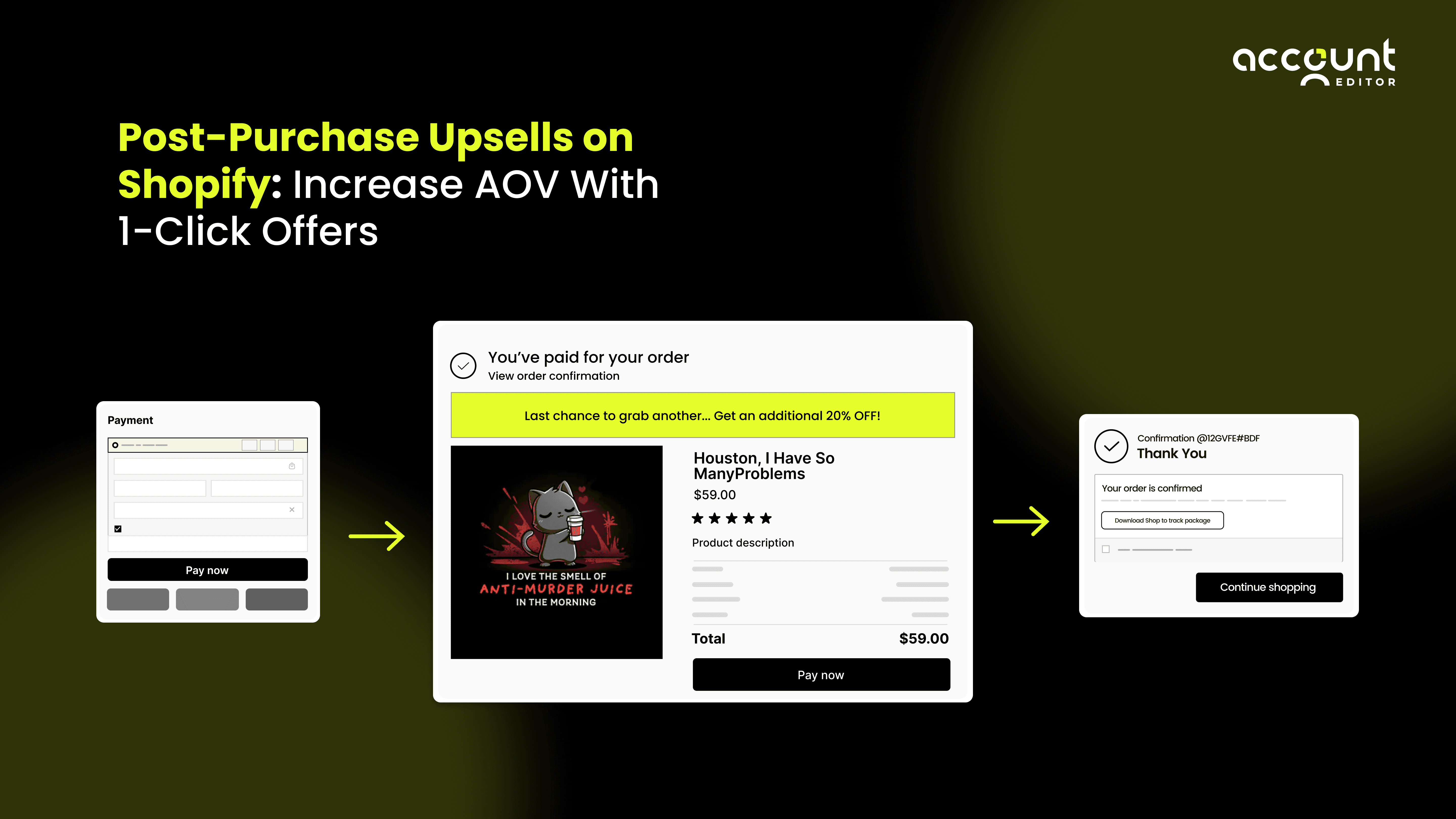
Customer acquisition costs are rising, and many Shopify merchants are shifting their focus toward increasing the value of each order rather than driving more traffic. A Shopify post-purchase upsell supports this by showing a simple 1-click upsell immediately after checkout, when customers are most likely to accept an additional item.
For example, a shopper who buys a $40 moisturizer may see a $12 applicator brush right after payment. This type of Shopify after-checkout upsell does not interrupt the purchase flow and often leads to higher acceptance rates, which can noticeably increase AOV across large order volumes.
Because the offer loads inside Shopify’s checkout, it remains fast, accurate, and mobile-friendly. Customers who revisit the order-status page to check or adjust details may also see relevant offers again in a natural way.This guide covers how Shopify post-purchase upsells work, why they convert well, how to set them up, and the operational factors merchants should consider when scaling them.
What Is a Post-Purchase Upsell on Shopify?
A Shopify post-purchase upsell is a complementary product or offer displayed immediately after a customer completes checkout. Instead of taking customers back to the cart or forcing them to re-enter payment data, Shopify allows them to accept the offer with a single click. This is what makes it a true 1-click upsell, fast, frictionless, and highly effective at increasing AOV.
To understand its impact, consider this:
If your current AOV is $50 and you achieve a modest upsell acceptance rate of 10 percent, offering a $15 add-on can instantly lift your revenue by:
0.10 × $15 = $1.50 extra per order
If you process 5,000 monthly orders, that is $7,500 per month in additional revenue.
This is the kind of scalable lift that makes Shopify post-purchase upsells so valuable.
How 1-Click Upsells Work After Checkout
When a customer completes their order, Shopify authorizes the payment and triggers the post-purchase page using Checkout Extensibility. If the merchant has enabled a post-purchase offer, it appears between the checkout completion step and the final order confirmation page.
If the customer accepts the offer, the Order Editing API adds the product directly to the order. Taxes, discounts, and shipping costs update automatically. For example:
Upsell price: $19
Tax: 10 percent
Shipping: unchanged
The customer then pays $20.90 total for the upsell, calculated instantly and accurately.
This prevents discrepancies and maintains a clean customer experience.
Why Post-Purchase Upsells Work
Post-purchase upsells align perfectly with buyer psychology and Shopify’s native checkout architecture.
Immediately after purchasing, customers experience a combination of satisfaction, trust, and reduced friction. Studies across DTC merchants show that post-purchase acceptance rates often fall between 10 and 25 percent, significantly higher than traditional pre-purchase popups that average 1 to 3 percent.
Quick Comparison (Acceptance Rates)
Upsell Type | Average Acceptance Rate | Scenario Example |
|---|---|---|
Pre-Purchase Popup | 1 to 3 percent | Interrupts checkout flow |
Post-Purchase Upsell | 10 to 25 percent | Appears after checkout, no friction |
Even at a 10 percent acceptance rate, a $20 upsell adds $2 to every order. For a brand processing 10,000 monthly orders, that is $20,000 per month in added revenue with zero increase in CAC.
With more than 70 percent of Shopify traffic on mobile, the absence of page reloads and extra forms significantly improves acceptance rates on small screens.
Types of Post-Purchase Upsells You Can Offer on Shopify
Different upsells deliver different results. Choosing the right one can dramatically increase AOV.
1. Add-On Accessories (High: 15 to 25 percent)
A customer buying a $40 moisturizer may gladly add a $12 applicator brush. If 20 percent accept, that is $2.40 extra per order.
2. Bundles, Refills and Quantity Upsells (Medium: 8 to 15 percent)
If a coffee bag is $18, offering a second for $15 is appealing.
A 12 percent acceptance rate yields $1.80 per order.
3. Priority Shipping, Warranty and Protection Plans (Very High: 20 to 35 percent)
For a POD store:
30 percent × $6.99 = $2.09 extra per order.
4. Behaviour-Based Cross-Sells (Medium: 6 to 12 percent)
A $9 pen added to a journal order accepted at 10 percent adds $0.90 per order.
Across thousands of orders, these micro-lifts compound significantly.
5. Which Upsell Type Works Best for Your Store Type?
DTC brands: small, highly relevant accessories
Subscription stores: refills and multi-unit offers
POD stores: priority shipping or personalization
Wholesale stores: bulk or carton-size upgrades
The Technology Behind Shopify Post-Purchase Upsells
Shopify’s post-purchase upsell system is powered by a combination of Checkout Extensibility, the Order Editing API, and the Cart Transform API. These technologies work together to ensure that any accepted upsell is added to the customer’s order accurately, without causing confusion, price mismatches, or manual work for the merchant. This technical foundation is one of the reasons why Shopify post-purchase upsells are more reliable and higher converting than traditional upsell apps that modify orders outside the checkout.
When a customer accepts a post-purchase offer, Shopify recalculates several important elements:
Product cost
Taxes based on the shopper’s region
Shipping rates if the eight or dimensions change
Discounts and price adjustments applied to the offer
These recalculations happen instantly, ensuring that the final confirmation page displays the correct total. This eliminates common issues merchants face with third-party upsell tools, such as incorrect totals, missing line items, or overcharging customers.
For example:
If a shopper accepts a $22 upsell on top of a $58 order, Shopify recalculates the entire transaction in real time.
New subtotal becomes $80
Tax at 8 percent becomes $6.40 instead of the original $4.64
Shipping only updates if the upsell changes weight, shipping profiles, or location rules
By updating totals automatically, Shopify prevents billing discrepancies and reduces the number of support tickets related to incorrect charges. This clean technical process improves customer experience and strengthens trust, which directly impacts the long-term success of your Shopify post-purchase upsell strategy. This built-in accuracy is also one of the main reasons merchants prefer native Shopify post-purchase upsells over pre-purchase upsells or third-party solutions. It ensures stable AOV growth, fewer operational errors, and a seamless experience for both the shopper and the fulfillment team.
Common Setup Issues and Fixes
Many merchants experience issues when setting up a Shopify post-purchase upsell for the first time. Most of these problems are simple configuration errors that prevent the post-purchase offer from appearing or functioning correctly. Understanding these common issues and how to fix them ensures a smooth 1-click upsell experience for your customers.
1. Upsell Not Showing
If your Shopify post-purchase upsell is not appearing after checkout, the most frequent causes include:
Shopify Payments is disabled
The post-purchase upsell page only works when Shopify Payments is active, since it enables the 1-click charge flow.Product is not eligible for post-purchase offers
Some products, such as subscription items or items with certain fulfillment rules, cannot be added through the Shopify after-checkout upsell page.Conflicting checkout extensions or apps
Multiple checkout customizations can interfere with how the post-purchase offer loads. Disabling or reordering extensions often resolves this.
These issues interrupt the upsell display, but once corrected, the 1-click upsell Shopify flow usually begins working immediately.
2. Discount Not Applying
If the discount on your post-purchase offer is not showing correctly, it is often caused by automatic discount rules or product-level restrictions. For example:
A product excluded from automatic discounts cannot receive a discounted post-purchase price.
A conflicting promotion may override the upsell discount logic.
Reviewing your discount settings typically resolves this issue quickly.
3. Why Fixing These Issues Matters
Fixing these setup errors ensures that your Shopify post-purchase upsell loads consistently and displays accurate pricing. This reduces customer confusion, prevents support cases, and improves acceptance rates. A smooth and reliable Shopify after-checkout upsell experience is essential for maximizing AOV and maintaining customer trust.
Designing High-Converting Shopify Post-Purchase Upsells
A high-performing Shopify post-purchase upsell is built on clarity, relevance, and simplicity. Since the offer appears right after checkout, customers make decisions quickly. A strong post-purchase offer should communicate the value of the product in a way that feels natural, helpful, and aligned with the item they just purchased.
1. What Makes a Strong Post-Purchase Offer
A well-crafted 1-click upsell on Shopify should clearly explain four things:
What the product is
The customer should understand exactly what is being offered without needing to click for more details.Why is it relevant to their purchase
Relevance is a key driver of acceptance rates. The upsell should feel like a logical next step based on what the customer just ordered.What value does it add
This can include convenience, savings, faster delivery, or improved results. Clear value increases trust and reduces hesitation.
Why the customer should act now A gentle reason to accept the offer immediately can improve conversions. This is not pressure, but context, such as time-limited pricing or convenience.
2. Example of a Clear Shopify Post-Purchase Offer
“Add a travel-size sunscreen for $7 and save 30 percent. This small add-on is ideal for daily commutes and outdoor plans.”
This type of targeted, benefit-driven messaging gives the shopper everything they need to make a quick decision. It is simple, highly relevant, and aligned with the context of a Shopify after-checkout upsell.
3. Why Detailed Offers Convert Better
Across Shopify stores, descriptive post-purchase offers routinely outperform generic ones by 10 to 18 percent. When the benefit is clear and the offer feels connected to the original purchase, customers are far more likely to accept the 1-click upsell. This makes strong copywriting a key part of increasing AOV through Shopify post-purchase upsells.
Operational Considerations Most Merchants Ignore
1. Payment Issues
If 2 percent of upsells fail and you process 5,000 orders: 100 failed upsells = $1,000 to $3,000 in lost revenue.
2. Inventory Allocation
With a 10 percent acceptance rate, every 1,000 orders requires roughly 20 additional units.
3. Split Shipments
A 0.5 lb upsell may increase shipping costs if your shipping tier changes at 1 lb.
4. Returns and Refunds
A $23 upsell may be refunded at $24.84 after Shopify recalculates taxes. Merchants must communicate this clearly.
How Account Editor Naturally Supports Post-Purchase Upsells
Account Editor enhances post-purchase upsell performance by improving the customer’s post-purchase journey.
1. More Return Visits
If 25 percent of customers revisit the order-status page to fix issues, that is 25 percent more upsell impressions, often boosting acceptance by 3 to 6 percent.
2. Fewer Cancellations
Reducing cancellations from 5 percent to 3 percent saves 2 percent of orders. At 10,000 orders per month, that is 200 additional orders, plus upsell revenue.
3. Support Reduction
Cutting 500 order-change tickets by 70 percent saves up to $3,000 in support labour.
4. Upsell-After-Correction Workflow
If 10 percent of editing customers accept an upsell, this becomes a meaningful revenue lift.
Automation Using Shopify Flow
Shopify Flow can:
Tag customers after a $30 upsell
Send follow-up offers after declines
Route fulfillment for low-inventory upsell items
Alert staff about pending upsell payments
If 8 percent of upsells require review, Flow can reduce manual workload by up to 90 percent.
AOV Increase Explained with Examples
Seeing the impact of a Shopify post-purchase upsell in real numbers helps illustrate how powerful even a small acceptance rate can be. Below is a simple formula that merchants use to estimate the potential increase in AOV generated by a 1-click upsell on Shopify.
H3: AOV Formula
AOV Lift = (Acceptance Rate × Offer Value) × Monthly Orders
This calculation shows how much additional revenue a post-purchase upsell can generate each month when customers accept the offer at checkout.
Example 1: Cosmetics Brand
A skincare brand offers a $20 add-on immediately after checkout.
Acceptance rate: 10 percent
Offer value: $20
Monthly orders: 6,000
AOV Lift = 0.10 × $20 × 6,000 = $12,000 per month
A simple 1-click upsell increases monthly revenue by twelve thousand dollars without changing traffic or marketing spend.
Example 2: Subscription Coffee Store
A coffee subscription brand adds a discounted refill pack as a post-purchase upsell.
Acceptance rate: 18 percent
Offer value: $12
Monthly orders: 4,000
AOV Lift = 0.18 × $12 × 4,000 = $8,640 per month
This type of Shopify after-checkout upsell not only increases AOV but also improves retention because customers run out of product less often.
Example 3: POD Store
A print-on-demand store offers a $6.99 priority shipping upgrade as a post-purchase offer.
Acceptance rate: 30 percent
Offer value: $6.99
Monthly orders: 8,000
AOV Lift = 0.30 × $6.99 × 8,000 = $16,776 per month
Shipping-related upsells often convert higher because they add convenience rather than requiring the shopper to evaluate a new product.
These examples demonstrate how Shopify post-purchase upsells can create meaningful, scalable increases in AOV, even with modest acceptance rates. Across thousands of orders, small lifts compound into substantial revenue gains.
Best Practices for Shopify Post-Purchase Upsells
Effective Shopify post-purchase upsells depend on relevance, clarity, and a simple decision path. A focused, well-structured offer increases acceptance and creates a smooth customer experience. Here are the essential best practices:
Keep the offer closely related to the original purchase
Relevant products consistently generate higher acceptance rates.Use clear, benefit-focused messaging
Explain what the item is and why it adds value to the customer.Limit the post-purchase page to one upsell
Multiple offers can create hesitation and reduce conversions.Optimize the upsell layout for mobile
Most shoppers view Shopify after-checkout upsells on smaller screens.Monitor inventory and fulfillment rules
Ensure the upsell product is always in stock and easy to ship.Refresh upsell rules regularly
Small adjustments, such as lowering the price by one to three dollars, can increase acceptance by 5 to 15 percent.
This balanced approach helps merchants increase AOV without adding friction or disrupting the customer journey.
Conclusion
Post-purchase upsells give Shopify merchants a powerful and sustainable way to increase AOV without risking checkout abandonment. Their placement between payment authorization and order confirmation makes them uniquely effective. When paired with operational excellence and self-serve order editing tools like Account Editor, which naturally re-engage customers on high-intent pages, merchants can create a scalable and profitable post-purchase engine.
Mastering Shopify post-purchase upsells is not just a tactic, it is a core strategy for predictable and margin-positive growth.